Why Every Business Needs DMARC: Check Your Domain’s Email Security

Cyber threats have escalated significantly in recent years. Last year, 64% of businesses reported facing Business Email Compromise (BEC) attacks, with an average financial loss of $150,000 per incident. The rise of remote work continues to increase companies’ vulnerability to security breaches.
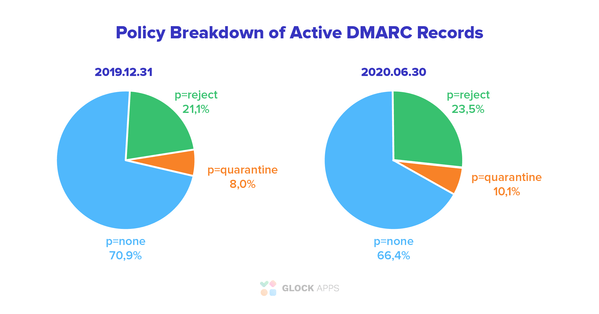
Given these alarming statistics, it’s surprising that many companies have not enhanced their email security with DMARC. Yet, according to dmarc.org, only 23.5% of those who have implemented it have reached a ‘reject’ policy.
What is DMARC?
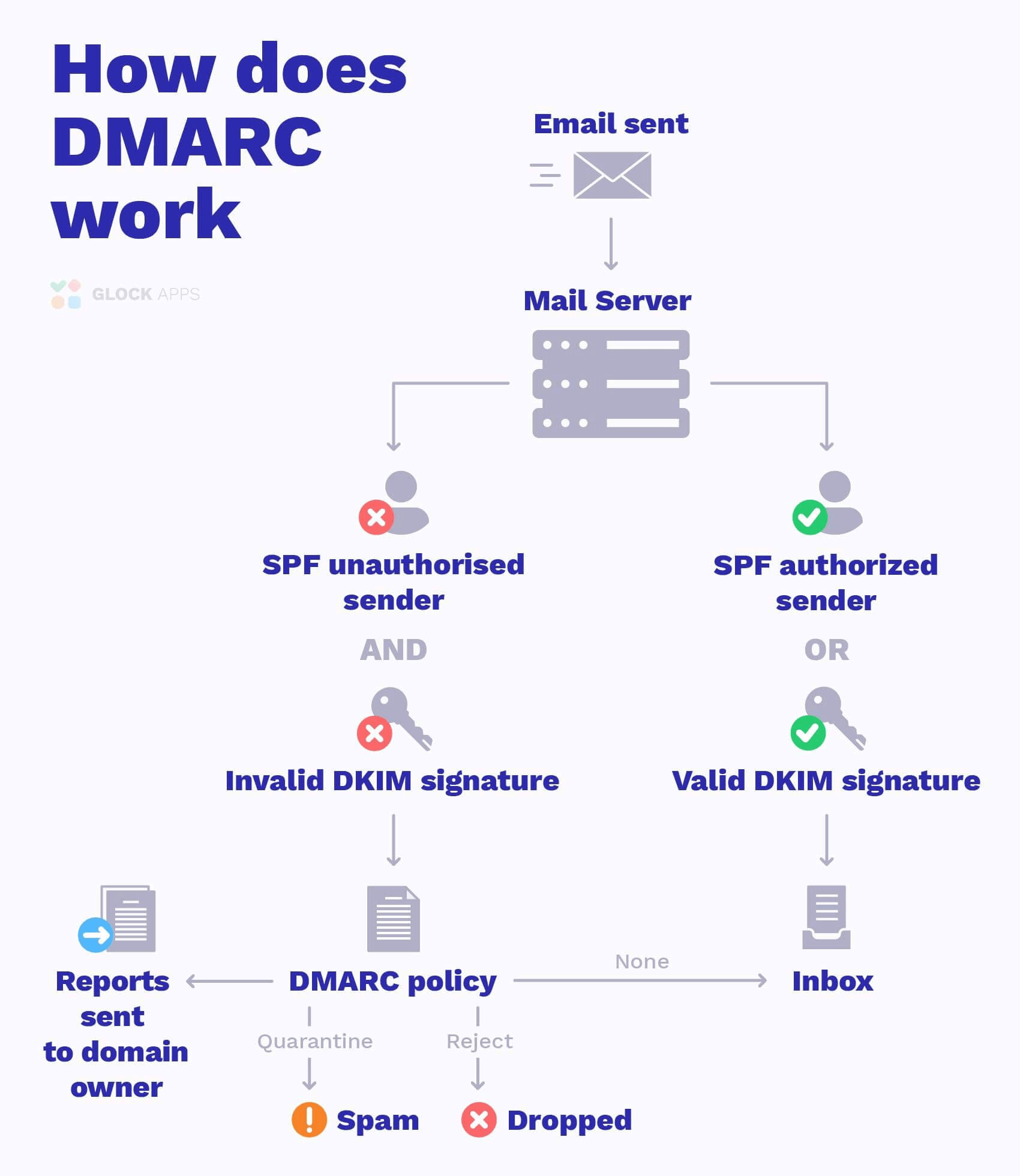
DMARC stands for Domain-based Message Authentication, Reporting & Conformance. It becomes your ultimate layer of email protection after SPF and DKIM. In layman’s terms, during email authentication, the first mail server checks SPF and DKIM authentication, and then DMARC runs alignment of those two protocols. According to the policy type (none, quarantine or reject), DMARC decides on what to do with every email, whether to let it into the inbox, quarantine it, or reject it entirely.
Is your DMARC setup working as expected?
Get a free check of your DMARC, SPF, DKIM, and other domain settings.
Business Size Doesn’t Matter
There is one myth about online scammers. It is widely believed that only large businesses, major corporations, and governments fall victim to email spoofing and phishing. And it feels logical because that’s where the money is. However, statistics tell us otherwise:
- 43% of SMBs don’t have any protection plans when it comes to cybersecurity;
- 28% of the breaches affect Small Businesses;
- For more than 30% of small businesses, phishing is a top threat.
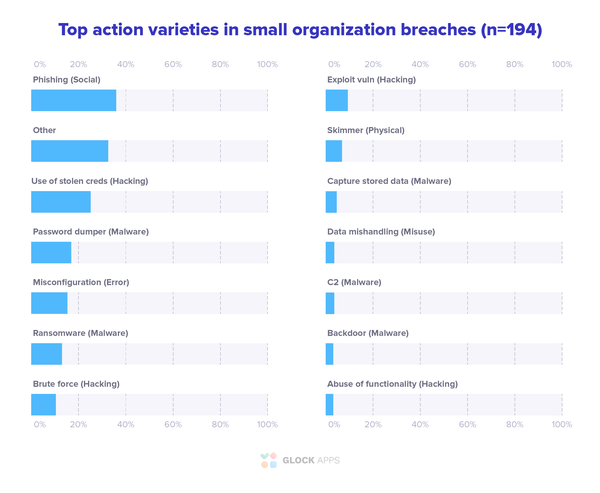
Verizon’s Data Breach Investigations Report
Among the most common reasons why small and medium businesses don’t take care of their email security is a lack of resources – finances, personnel, time, etc. And the wrong belief that attackers would target larger goals.
So, in this light, corporations and larger businesses must have DMARC in place and run on the ‘reject’ policy? Unfortunately no. According to the Agari report, among Fortune 500 only 33% have a DMARC record, and only 8% have activated it.
How so? Mostly because large corporations have numerous email streams, subdomains, and third-party organizations involved in the email-sending process. One mistake in a record could lead to a massive breakdown, and the intricacies of implementing higher levels of DMARC security (‘quarantine’ and ‘reject’ policies) could lead to blocking legitimate emails. And such an interruption of important email communication could lead to financial and reputational losses.
Read also:
What is DMARC: Email Security with DMARC, SPF, and DKIM
DMARC Adoption: What’s the Problem?
How do I remove the domain from DMARC Analytics?
DMARC Mandates and Guidance Worldwide
Authenticate Emails with DMARC for Better Deliverability
What Benefits Does DMARC Have
Whatever the size of your business – DMARC provides universal benefits for all.
- Full visibility. When you implement a DMARC record, it will send you reports with all the traffic happening on your domain. If there are any unsolicited email senders – you will easily detect them.
- Control. With the DMARC reporting system, you get full control over the email sending sources. You can handle authentication issues when they appear with legitimate senders, and block unauthorized emails.
- Security. That’s what DMARC was created for. Just instruct what you want to be done with suspicious emails and any unauthenticated message will be quarantined or rejected.
- Deliverability. Does the DMARC record improve deliverability? Although not created to help your email get into the inbox, it actually does so. Receiving servers, especially those of large mailbox providers are very thorough as to what emails their users receive. Being authenticated with DMARC makes you a legitimate sender in the eyes of the ISPs.
As you may see, the benefits of DMARC implementation are hard to dismiss. Both SPF and DKIM have their vulnerabilities and downsides. Using DMARC on top of these two protocols will strengthen your domain defenses, making sure no malicious actor sends email on your behalf.
How DMARC Supports Modern Email Security
DMARC is no longer just a recommended security measure for businesses. Email providers have introduced stricter authentication requirements, while standards such as BIMI build on DMARC to provide additional brand protection.
BIMI and Brand Authentication
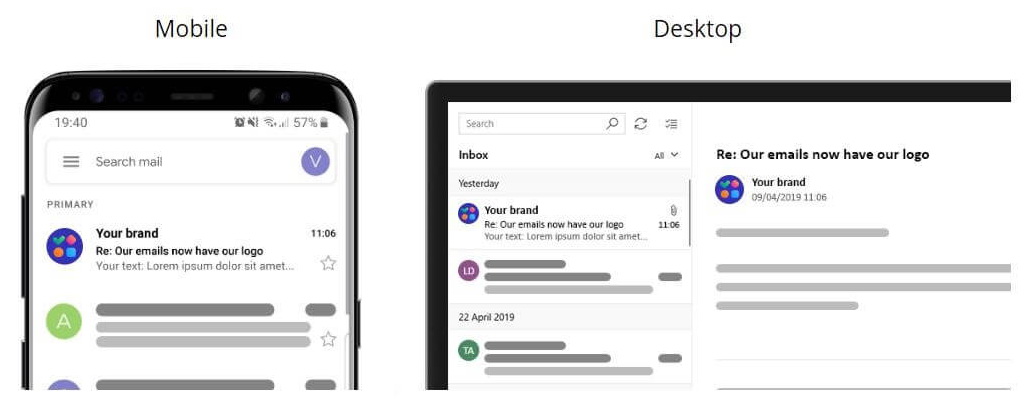
BIMI (Brand Indicators for Message Identification) allows participating mailbox providers to display a verified brand logo alongside authenticated emails. It can help recipients recognize legitimate messages and distinguish them from impersonation attempts.
DMARC is a prerequisite for BIMI. To use BIMI, a domain generally needs an enforced DMARC policy rather than p=none.
The BIMI standard requires the organizational domain to use p=quarantine or p=reject with enforcement applied to 100% of messages.
Mailbox providers can also apply their own requirements. For example, Gmail requires p=quarantine or p=reject, pct=100, and a Verified Mark Certificate (VMC) or Common Mark Certificate (CMC) for its BIMI implementation. Yahoo currently displays BIMI logos when the domain has a valid BIMI record, an enforced DMARC policy, and meets its additional sending, reputation, and engagement criteria. Yahoo does not currently require a VMC for BIMI logos to appear in its applications.
This makes DMARC part of a broader email security framework: it helps protect a domain from unauthorized use while also providing the authentication foundation for standards such as BIMI.
No Auth, No Entry: DMARC Is Becoming Part of Sender Requirements
You’ve probably heard this phrase: “No auth, no entry”. Email now has a similar rule: no authentication, no inbox. For businesses that send email at scale, authentication is no longer optional. Major mailbox providers are tightening their requirements, making SPF, DKIM, and DMARC essential for protecting deliverability.
Gmail, for example, requires bulk senders that send 5,000 or more messages per day to personal Gmail accounts to use SPF, DKIM, and DMARC. Messages that don’t meet these requirements may be rejected or routed to spam.
DMARC adds an important layer of protection. It allows receiving servers to check whether the domain in the visible From address matches the domain authenticated through SPF or DKIM. It also lets domain owners specify what should happen when a message fails authentication.
The takeaway is simple: if your business depends on email, proper authentication is not a nice-to-have but a basic requirement.
Learn More About DMARC Reporting:
DMARC Report Analyzer- Improve Email Deliverability
What is a Rua tag, and why does my DMARC record need it?
How to Protect Sender Domain with DMARC: Using DMARC Enforcement
DMARC Fail: What Causes DMARC Failure?
The Ultimate Guide to Email Authentication
Can I have multiple DMARC records on my domain?
How does Return-Path apply to SPF and DMARC?
How do I use different DMARC policies for the domain and subdomains?
How can I stop receiving DMARC reports for a domain?
How is DMARC compliance calculated?
Recap
DMARC is an important part of protecting a business domain from spoofing and unauthorized email use. It gives organizations visibility into how their domain is being used, helps identify authentication problems, and allows them to specify how receiving servers should handle messages that fail DMARC checks.
DMARC is also becoming part of the requirements for businesses that send email at scale. Major mailbox providers have introduced stricter authentication requirements, making proper SPF, DKIM, and DMARC configuration increasingly important for email delivery.
DMARC also provides the foundation for standards such as BIMI. If you want your brand logo to appear through BIMI, your domain needs an enforced DMARC policy, along with any additional requirements set by the mailbox provider.
The challenge is that implementing DMARC properly requires visibility into all the services sending email on behalf of your domain. GlockApps DMARC Analytics helps you analyze DMARC reports, identify sending sources and authentication issues, and monitor your domain with 10,000 free DMARC messages per month.
FAQ
Start Using DMAR
DMARC helps protect your domain from spoofing and phishing by letting mailbox providers verify whether messages claiming to come from your domain pass email authentication. You can also publish a policy telling receiving systems what to do with messages that fail DMARC, such as sending them to spam or rejecting them.
Without a DMARC record, your domain has no published DMARC policy or reporting instructions, leaving it more exposed to spoofing. DMARC is also now part of the sender requirements enforced by major mailbox providers. Gmail, Yahoo, and Microsoft require high-volume senders to publish a DMARC record, with requirements applying to messages sent to their consumer mail services. Non-compliant messages can face delivery problems, including spam placement, rate limiting, or rejection.
You can check your domain with a free DMARC checker from GlockApps. It can show whether a DMARC record exists, which policy is published (none, quarantine, or reject), and whether the record contains reporting addresses and other expected settings.
Yes. Publishing a DMARC record is free because it is a DNS TXT record that you add to your domain. However, monitoring and analyzing DMARC reports may require a separate tool or service.
DMARC can support email deliverability, but it is not a direct deliverability optimization. Proper DMARC authentication helps mailbox providers verify that your messages are authorized to use your domain. A properly configured DMARC setup can also help protect your domain reputation by making it harder for unauthorized senders to use your domain for phishing and spoofing.
Related Posts

A DMARC (Domain-based Message Authentication Reporting and Conformance) protocol provides email senders with a powerful tool to protect their email Read more

The DKIM protocol, along with SPF, DMARC, and BIMI form the perfect ensemble for email security. Any one of those Read more

Implement a DMARC record to create a safe environment for both your company and your audience. As the most effective email Read more

This article will teach you what an SPF record is and how you can create an SPF TXT record that's Read more