Outlook Rejects Email Without DMARC: Fix the Bounce, Then Test Placement
Estimated reading time: 12 minutes
Microsoft has confirmed a fault and rolled it back. In incident EX1545193 on its Microsoft 365 service health page, closed on 10 November, Microsoft says a recent update to its spam enforcement rules caused mail to Outlook.com, Hotmail and Live addresses to be “incorrectly marked and blocked” from 18:00 UTC on 6 November to 11:02 UTC on 9 November, and that the update has been fully rolled back. The non-delivery reports it lists are 550 5.7.1 and 550 5.7.23. Microsoft 365 admins can read the notice under Service health in the admin center, and the University of Pennsylvania’s copy of Microsoft’s notices is public. Our seed tests fit that window: on 7 November, inside it, all 16 Outlook.com and Hotmail seeds refused the message from a domain with no DMARC record; at 15:09 UTC on 9 November, four hours after it closed, all 16 received the same send (in spam, like every other message from this domain), with SPF and DKIM passing and no DMARC record found. So there is no new DMARC requirement for small senders. Before the fix was announced, a Microsoft support moderator on Microsoft’s Q&A forum had called the refusals “an ongoing Exchange service issue”, and The Register covered it. A bounce quoted on the forum starts with 550 5.7.23 … Sender Policy Framework violation, so many senders read it as an SPF validation error; it ends with the same 550 5.7.1 text. While the fault lasted, a DMARC record stopped it, in our tests and in the forum reports, and p=none was enough, so a record is still worth having.
In early November 2026, Outlook.com and Hotmail refused mail from domains that publish no DMARC record, even when SPF and DKIM passed. The bounce read 550 5.7.1 Message rejected: Message lacks SPF/DKIM/DMARC Auth Records (AS9031519). Adding a DMARC record fixed it. We checked both outcomes separately: whether Outlook accepted the message, and where accepted copies landed.
We ran eight seed tests over two days with GlockApps, varying the DMARC records of two test domains while keeping the sending service and the SPF and DKIM setup fixed. The bounce went away with every record we tried, even p=none published only on the parent domain. The folder didn’t change with the record: one domain stayed in Outlook’s spam folder through every record we tried, and the other reached the inbox every time.
Disclosure: GlockApps and DMARKOFF are built by the same team. All domains and accounts in the test were our own.
Key takeaways
- No DMARC record anywhere: refused, until Microsoft’s rollback. All 16 Outlook.com and Hotmail seed mailboxes refused the message at SMTP on 7 November; Microsoft later traced it to a faulty spam rule and rolled it back on 9 November. In GlockApps, it shows as missing, not as spam.
- Every DMARC configuration we tested stopped the refusal. Both p=none and p=reject worked, including a record published only on the parent domain. SPF and DKIM were set up to pass and align throughout.
- The record didn’t decide the folder. With identical DMARC records, sent in the same minutes, one domain reached the inbox at all 16 Outlook.com and Hotmail mailboxes and the other landed in spam at all 16.
- Microsoft 365 accepted everything. The five Microsoft 365 mailboxes put every message in the inbox, including the one with no DMARC record anywhere.
- Test after you fix DMARC. In our no-DMARC case, the SMTP log explained the missing seeds. After publishing DMARC, a placement test showed where the accepted messages landed.
How we tested
We used two subdomains of our test domain mailpath.io, here called m00 and m01, both set up in Mailgun since October 2026. Both were configured for passing SPF with Mailgun’s include and for DKIM signed by Mailgun with a domain matching the From address. Receiver authentication headers weren’t available for the copies refused at SMTP. In this run, Mailgun sent each subdomain’s mail from a different pair of shared IP addresses. The parent domain, mailpath.io, normally publishes v=DMARC1; p=reject; sp=reject.
Between tests, we changed only the DMARC records: the subdomain’s own record and the parent’s. The records had a TTL of 300 seconds, and our DNS host lets resolvers cache a “no record” answer for 900 seconds. Each test went out more than five minutes after the previous test’s last delivery, so receivers couldn’t still be using a record they had fetched during it. When a record came back after a test that had found it missing, the next test waited more than 15 minutes. We checked the records between tests through a recursive resolver. Each test went to the same 24 GlockApps seed mailboxes: 16 at Outlook.com and Hotmail (including Outlook.de and Outlook.fr addresses), 5 at Microsoft 365, and 3 at Gmail. We read the folders in GlockApps and the SMTP replies in Mailgun’s log. The tests ran on the evening of 7 November and the morning of 8 November 2026 (UTC).
The results of all eight tests
| Domain | Its own record | Parent’s record | Outlook.com, Hotmail (16) | Microsoft 365 (5) | Gmail (3) |
|---|---|---|---|---|---|
| m01 | none | none | missing (refused) | inbox | 2 inbox, 1 spam |
| m01 | none | p=reject | spam | inbox | inbox |
| m01 | none | p=none | spam | inbox | inbox |
| m01 | p=none | p=none | spam | inbox | inbox |
| m01 | p=reject | p=reject | spam | inbox | inbox |
| m00 | p=reject | none | inbox | inbox | 2 inbox, 1 spam |
| m00, twice | p=reject | p=reject | inbox | inbox | inbox |
No DMARC record: missing, not in spam
With no DMARC record on m01 and none on mailpath.io, every Outlook.com and Hotmail seed came back empty, while Microsoft 365 put the message in the inbox:
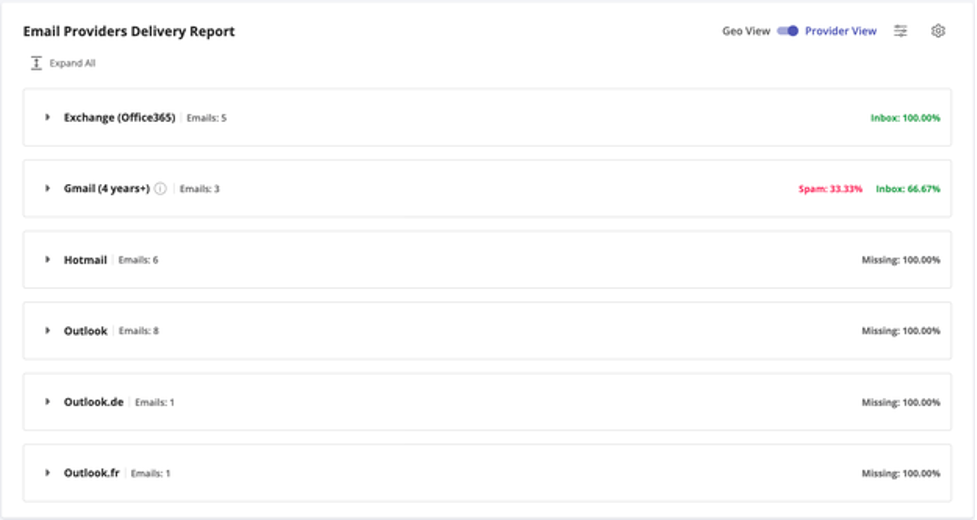
Missing isn’t the same as spam. Mailgun’s log shows why: each Outlook.com and Hotmail mailbox refused the message during the SMTP session.
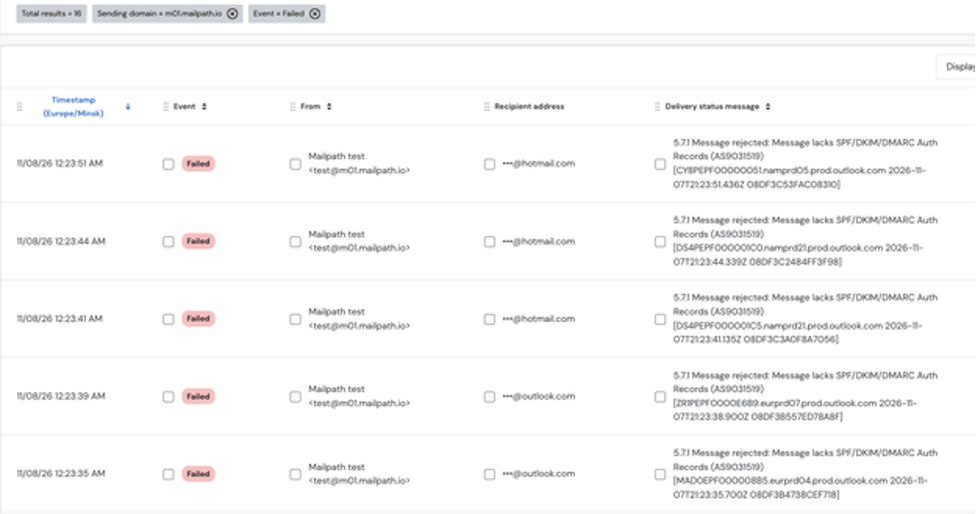
If a placement test shows Outlook.com and Hotmail seeds missing while Microsoft 365 and Gmail receive the message, check your bounces for AS9031519 before anything else.
The tested DMARC records restored acceptance, including p=none on the parent
Across four configurations with a DMARC record present, Outlook.com and Hotmail accepted the message every time:
- Only on the parent domain, p=reject; sp=reject: accepted.
- Only on the parent domain, p=none; sp=none: accepted.
- On the subdomain, p=none, and on the parent, p=none: accepted.
- On the subdomain, p=reject, and on the parent, p=reject: accepted.
In our test, a record on the organizational domain covered the subdomain we sent from, and p=none was enough to stop the refusal. That makes p=none with a report address the safe first step for a domain that has no DMARC yet: v=DMARC1; p=none; rua=mailto:<your report address>. The reports show who sends mail as your domain before you move to quarantine or reject.
Fixing DMARC doesn’t fix the folder
Every test of m01 that Outlook.com and Hotmail accepted ended up in spam: with no record of its own, with p=none, with p=reject. Every test of m00 reached the inbox. The last pair reproduced the difference with matching DMARC records and nearly simultaneous sends: both domains had their own p=reject record and the same parent record, and went out in the same three minutes.
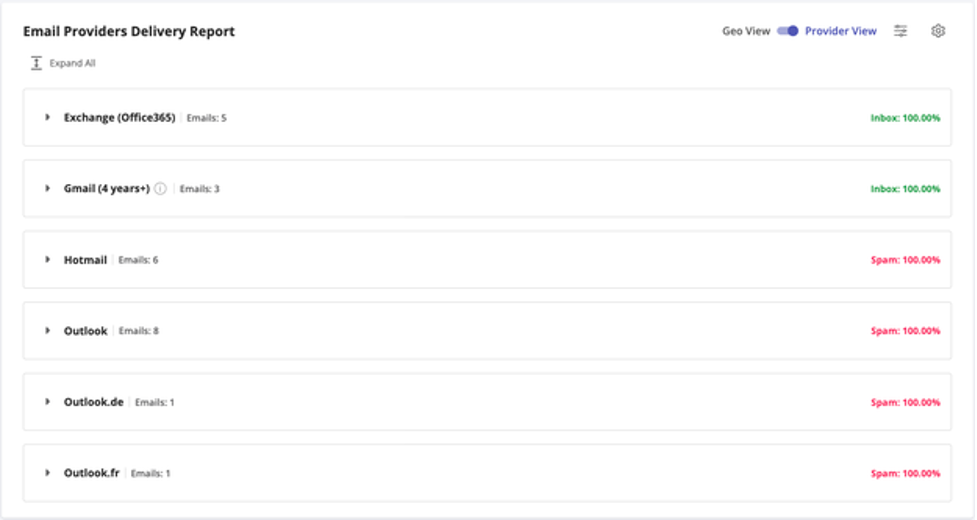
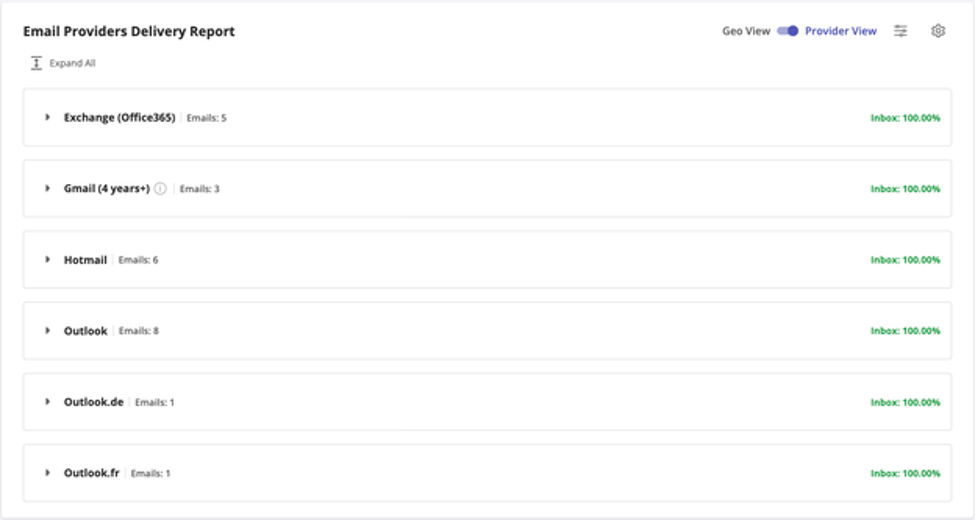
Both subdomains used Mailgun and equivalent SPF, DKIM and DMARC settings, but their messages left from different IP addresses in this run. The accepted messages split by sender every time: m00 reached the inbox and m01 went to spam. These tests don’t separate the domain’s history from its sending IPs or other filtering signals. They do show that DMARC only decided whether the mail was accepted.
One more difference in their history: in our earlier experiments, m01 was a control that sent mail without an aligned DKIM signature, while m00 always signed for its own domain. We haven’t tested whether that, the IPs or something else is the reason.
What to check
- Make sure DMARC covers every domain you send from. That’s the domain in the From address, or its organizational domain. A domain that sends only transactional mail, or an old brand, is the most likely to have none.
- Start with a valid p=none record and a report address if a domain has no applicable DMARC record, and check that the service that actually sends the mail passes aligned SPF or DKIM. In our test, publishing DMARC restored SMTP acceptance; it didn’t guarantee the inbox.
- Run a placement test once cached DNS answers have expired, with the same sending service and From domain. Outlook.com and Hotmail seeds should move from missing to delivered. If they land in spam, SMTP acceptance is back; check the receiver’s SPF, DKIM and DMARC results before treating authentication as fixed, and if those pass, look at the sending IPs, the sender’s history, the content and the recipients. Placement alone doesn’t name the cause.
- Test each sending domain separately. In our test, two subdomains of the same parent, with the same DMARC records, landed in different folders at Outlook.com and Hotmail.
- Watch your bounces for AS9031519. Microsoft rolled back the rule behind it on 9 November, so a new one deserves a look. If it appears for a domain that has a record, check that exactly one valid record applies to it, and that SPF or DKIM passes and aligns for the service that sends the mail.
Conclusion
In our test, Outlook.com’s refusal, which Microsoft later traced to a faulty spam rule and rolled back on 9 November, had an easy fix: a DMARC record at the sending domain or its parent, with p=none enough. The fix got the mail accepted, not delivered to the inbox: the same DMARC records left one sender in the inbox and the other in spam at all 16 Outlook.com and Hotmail mailboxes. The original write-up on the DMARKOFF blog has every phase of the test, Mailgun’s log and the background on Microsoft’s sender requirements.
FAQ
No. On 10 November, Microsoft closed incident EX1545193: an update to its spam enforcement rules had blocked mail to Outlook.com, Hotmail and Live addresses from 18:00 UTC on 6 November to 11:02 UTC on 9 November, and Microsoft rolled it back. Our repeat at 15:09 UTC on 9 November matched: all 16 Outlook.com and Hotmail seeds received mail from our domain with no DMARC record anywhere, after refusing the same send at all 16 on 7 November. Publish a DMARC record anyway: while the refusals lasted, p=none was enough.
From 6 to 9 November 2026, one reason was a missing DMARC record. Outlook.com and Hotmail refused mail from domains with no DMARC record at the domain or its parent, with 550 5.7.1 … Message lacks SPF/DKIM/DMARC Auth Records (AS9031519). The message never reaches the mailbox, so the seed shows it as missing.
Not necessarily. Bounces quoted on Microsoft’s forum start with 550 5.7.23 … Sender Policy Framework violation and end with the same 550 5.7.1 … Message lacks SPF/DKIM/DMARC Auth Records text, and Microsoft’s incident notice lists both codes under the same faulty spam rule. In our tests, SPF passed and aligned, and the refusal came only when no DMARC record applied to the domain. Check DMARC first, then SPF and DKIM for the service that sends the mail.
To stop the refusal, yes, in our test. Outlook.com and Hotmail accepted mail from a domain whose only DMARC record was p=none on the parent domain. Whether the mail reaches the inbox is a separate question.
In our test, yes. A subdomain with no record of its own was accepted while its parent published DMARC, with p=reject and with p=none, and refused once the parent’s record was removed.
Not by itself. In our test, a domain that landed in spam at Outlook.com and Hotmail stayed there with no record of its own, with p=none and with p=reject, while another domain with the same records, sending from different Mailgun IPs, reached the inbox.
Not in our test. Five Microsoft 365 mailboxes accepted mail from a domain with no DMARC record anywhere and put it in the inbox.
Limitations
- One message per mailbox and test, over two days. The refusal and the folders were consistent across all 16 Outlook.com and Hotmail seeds in every test, but a larger sample could show exceptions.
- Two domains, one ESP. Both domains sent through Mailgun’s shared IPs. They also sent from different Mailgun IPs. The folder difference between them is real in our data; its cause isn’t established.
- Seed mailboxes. GlockApps’ Outlook.com and Hotmail seeds are real consumer mailboxes, and their folders also reflect their own history.
- A fault, now rolled back. Microsoft traced the refusals to an update of its spam enforcement rules and rolled it back on 9 November. These results describe Outlook.com and Hotmail from 7 to 9 November 2026, while the update was in place and just after.
Related Posts

A company publishes a BIMI record to display its logo in recipients’ inboxes. The DNS record looks correct, email authentication Read more

When a message doesn't arrive, the bounce is often the only explanation a sender gets: a reply code, a line Read more

Cold email campaigns can lose effectiveness surprisingly quickly. Messages that previously reached prospects start landing in spam, bounce rates increase, Read more

An email campaign can fail before the first click: the message lands in spam, the mobile layout breaks, or a Read more