Who Clicks Your Email Links? A Test Across 130 Seeds
Estimated reading time: 14 minutes
A subscriber asks for your newsletter, and before they open the confirmation email, the confirmation link has already been used. Across six GlockApps seed runs, we logged automated requests to test links only for copies sent to Microsoft 365 business seeds. In both newsletter copies the scanner checked, a simple visit to the footer link triggered the test unsubscribe. Visits to the separate one-click unsubscribe endpoint left both of its test tokens unused.
It started with odd visits in our own web analytics. Over six runs, we sent 544 messages to 130 GlockApps seeds, including five spam-filter checks, plus six internal authentication messages. The seeds were at Gmail, Outlook.com, Yahoo, Microsoft 365, GMX, Mail.ru and two dozen other providers. Every link carried its own token, and the server behind the links logged every request.
Disclosure: GlockApps and DMARKOFF are built by the same team. All domains, servers and accounts in the test were our own.
Key takeaways
- Only Microsoft 365 business seeds fetched the links. Microsoft’s network requested links in 19 of the 34 copies, with links sent to Microsoft 365 business seeds. We saw no requests to our test links from any other seed.
- Short links that act on a visit were triggered. A short confirmation link that acted on a plain visit was triggered in 15 of 15 checked copies, and a page that confirmed by script as it loaded in 17 of 17. In both checked newsletter copies, the footer unsubscribe link was triggered too.
- Button-based confirmations weren’t. Neither button-based confirmation was triggered in the four scanned copies that carried them, and the one-click unsubscribe endpoint received no POST.
- Copies with observed scans took longer. In the same five Exchange Online seeds, Inbox Insight reported 64 to 206 seconds for the 14 copies whose links were fetched and 3 to 13 seconds for the other 16.
- Image fetches at delivery. Google’s image proxy loaded the image in 60 of 62 HTML copies sent to Gmail and Google Workspace seeds, and Proton’s in 3 of 3, within seconds of delivery.
Why we ran this test
From 8 to 10 November, PostHog recorded 39 sessions on dmarkoff.com, the site of our DMARC monitoring product, from the Microsoft network ranges we examined. In 29 of them, the visitor requested one of three addresses that don’t exist on our site, two of them were altered forms of a blog post’s address. On 10 November, 14 sessions came in 84 seconds, followed by 13 more about four hours later. That afternoon, PostHog logged a pageview on a password-reset URL, including the reset token, from an IP address we’d seen the previous evening on one of the altered URLs. None of the 39 sessions were flagged as a bot in PostHog. That raised a question: what happens when an automated visit reaches a link that takes action as soon as it opens? We set up a test to find out.
How we tested
We set up a new link host, go.dmarcjet.com, on a domain we had kept parked and unused. Its server logged every request, including headers and timing. Each copy carried its own token in every link, so a request named the copy and the seed it came from. A few requests lost that link: 17 requests arrived with their query values changed, without the original token.
The messages went out through Mailgun from dmarcjet.com, with SPF, DKIM, and DMARC passing where the receivers reported them. Mailgun’s click and open tracking was off, and we watched the URLs on our own server. We read placement and delivery time in Inbox Insight, and started the tests and collected the results with the GlockApps MCP server.
The first three runs used one template, a weekly summary, with one change: the short one-time link was added after the first run. Each seed got either an HTML version (multipart/alternative, with a plain-text part) or a plain-text-only version, swapped between runs. These are the links it carried:
| Link | What it does | What it answers |
|---|---|---|
| Plain link | Opens a page | Who opens links at all, and when |
| Redirect chain | Three redirects, then the page | Do they follow redirects |
| Hidden link | display:none in the HTML | Any request is automated |
| Text-part link | Only in the plain-text part | Which part they read |
| Bare domain | go.dmarcjet.com/… as text, no link | Do they turn text into links |
| Image | A banner from our server | Who loads images, and when |
| Query-string link | Token in ?t= | Are parameters kept |
| Confirm on visit | A long link, and later a short one (/k/<token>), used up by the first visit | Does a one-click confirmation survive |
| Confirm by script | The page confirms by script as it loads, like a single-page app | Does a scanner that runs scripts trigger it |
| Confirm by button | Used up only by the button on the page | Do scanners press buttons |
Runs l1 to l3 and l6 went to the whole seed list, l4 to Microsoft’s seed groups only, l5 to the Microsoft 365 business seeds only. Run l4 sent two Exchange Online seeds a control message with no links, run l5 added two confirmation buttons behind short links (a form button and a button that confirms by script), and run l6 was a short newsletter with a footer unsubscribe link and a List-Unsubscribe header. We watched the server for three to six days after each run, until 22 November.
GlockApps’ own checks also load a message’s images for its content analysis and the report preview. We separated those requests and left them out.
We saw background traffic on the new host before the first email went out: scanners found it within seconds of Let’s Encrypt validating its certificate (public certificate transparency logs are a likely way), and bots probed it for secrets. None of those requests contained a test token.
We observed link fetches only for Microsoft 365 business copies
| Seeds | Addresses | Copies | Copies with a link request | Image loaded |
|---|---|---|---|---|
| Microsoft 365, Exchange Online | 5 | 30 | 14 of 28 with links | by Microsoft, with the links |
| Microsoft 365, GlockApps’ EOP check | 1 | 6 | 5 of 6 | by Microsoft, with the links |
| Outlook.com and Hotmail | 16 | 80 | 0 | no |
| Gmail and Google Workspace | 25 | 98 | 0 | Google’s proxy, 60 of 62 HTML copies |
| Google Spam Filter | 1 | 4 | 0 | Google’s proxy, 3 of 3 HTML copies |
| Proton | 1 | 4 | 0 | Proton’s proxy, 3 of 3 HTML copies |
| Yahoo, AOL, AT&T | 20 | 80 | 0 | no |
| Proofpoint, Barracuda, SpamAssassin | 3 | 12 | 0 | no |
| 21 other providers | 58 | 230 | 0 | no |
We saw no requests to our test URLs from the Outlook.com and Hotmail seeds. No requests to our server doesn’t mean no check: a filter can check a URL’s reputation without fetching it, or check it when the recipient clicks. The same goes for Gmail, Proofpoint and Barracuda, whose link checks are also set by their owners. “Microsoft (EOP)” is the name of a GlockApps check; one seed of it doesn’t show what Exchange Online Protection does on its own.
Confirmation and unsubscribe links
| How the link works | Copies with it, checked by Microsoft | Triggered |
|---|---|---|
| Confirms on a visit, long link | 17 | 0: in none of the 17 did a request reach the original URL |
| Confirms on a visit, short link (/k/<token>) | 15 | 15 |
| Page confirms by script as it loads | 17 | 17 |
| Form with a Confirm button | 4 | 0 |
| Button that confirms by script when clicked | 4 (the same four) | 0 |
| Newsletter footer link, unsubscribes on a visit | 2 | 2 |
| List-Unsubscribe URL, test endpoint configured to unsubscribe on POST | 2 | 0: visited, no POST to that endpoint |
So a double opt-in link that confirms on a plain visit can be confirmed for a Microsoft 365 subscriber who never opened the email, and a single-page app that confirms as soon as the page loads gets the same treatment, because the scanner runs its scripts. The requests for the long confirmation link went to altered URLs. None reached the original URL, and none used the token.
Neither button-based confirmation was triggered in the four scanned copies. On two pages, the page’s script recorded one click event without telling us where; no confirmation followed.
In both scanned copies of the newsletter, a GET to the footer link triggered the test unsubscribe action. The scanner also fetched the URL in the List-Unsubscribe header, but sent no POST to that endpoint. Because that endpoint acted only on POST, the scanner’s GET left both test tokens unused.
What the scanner fetched
The requests came from Microsoft’s network, in a browser that ran JavaScript. It read both the HTML and the plain-text part, so links that exist only in the text part or are hidden in the HTML were fetched too, and in some copies a bare domain written as text. It followed the redirect chain to the end. Some addresses arrived changed, with parts of the path or the query string replaced, so those requests didn’t reach the original URL.
Times from SMTP acceptance, over the checked copies: the image was fetched 3 to 9 seconds after acceptance (in the 17 checked copies that had one), the first link 16 to 57 seconds after, and the last request to a test link 17 to 79 seconds after.
One checked copy, run l5, Exchange Online mailbox 1:
| Seconds after SMTP acceptance | What reached our server |
|---|---|
| 6 | The image |
| 26 | Eight link requests arrived within about a second, including the button pages and the hidden link |
| 27 | A GET to the short confirmation link used its token |
| 31 | A POST from the on-load confirmation page used its token |
| 50 | A repeat POST to the same confirmation endpoint found the token already used |
Exchange Online copies with observed scans took longer
In the same five Exchange Online seed mailboxes, Inbox Insight reported delivery times of 64 to 206 seconds for the 14 copies whose links were fetched and 3 to 13 seconds for the other 16. In run l4, we sent a no-URL control to two mailboxes whose earlier copies had received link requests. Inbox Insight reported 5 and 6 seconds for those controls.
| Run | Mailbox 1 | Mailbox 2 | Mailbox 3 | Mailbox 4 | Mailbox 5 |
|---|---|---|---|---|---|
| l1 | fetched, 65 s | 4 s | fetched, 64 s | 4 s | fetched, 94 s |
| l2 | fetched, 100 s | 7 s | 7 s | fetched, 206 s | 7 s |
| l3 | fetched, 99 s | 4 s | fetched, 68 s | 13 s | fetched, 112 s |
| l4 | no URLs, 5 s | 6 s | no URLs, 6 s | fetched, 71 s | fetched, 97 s |
| l5 | fetched, 120 s | 5 s | fetched, 144 s | 6 s | fetched, 118 s |
| l6 | fetched, 64 s | 3 s | 6 s | 6 s | 6 s |
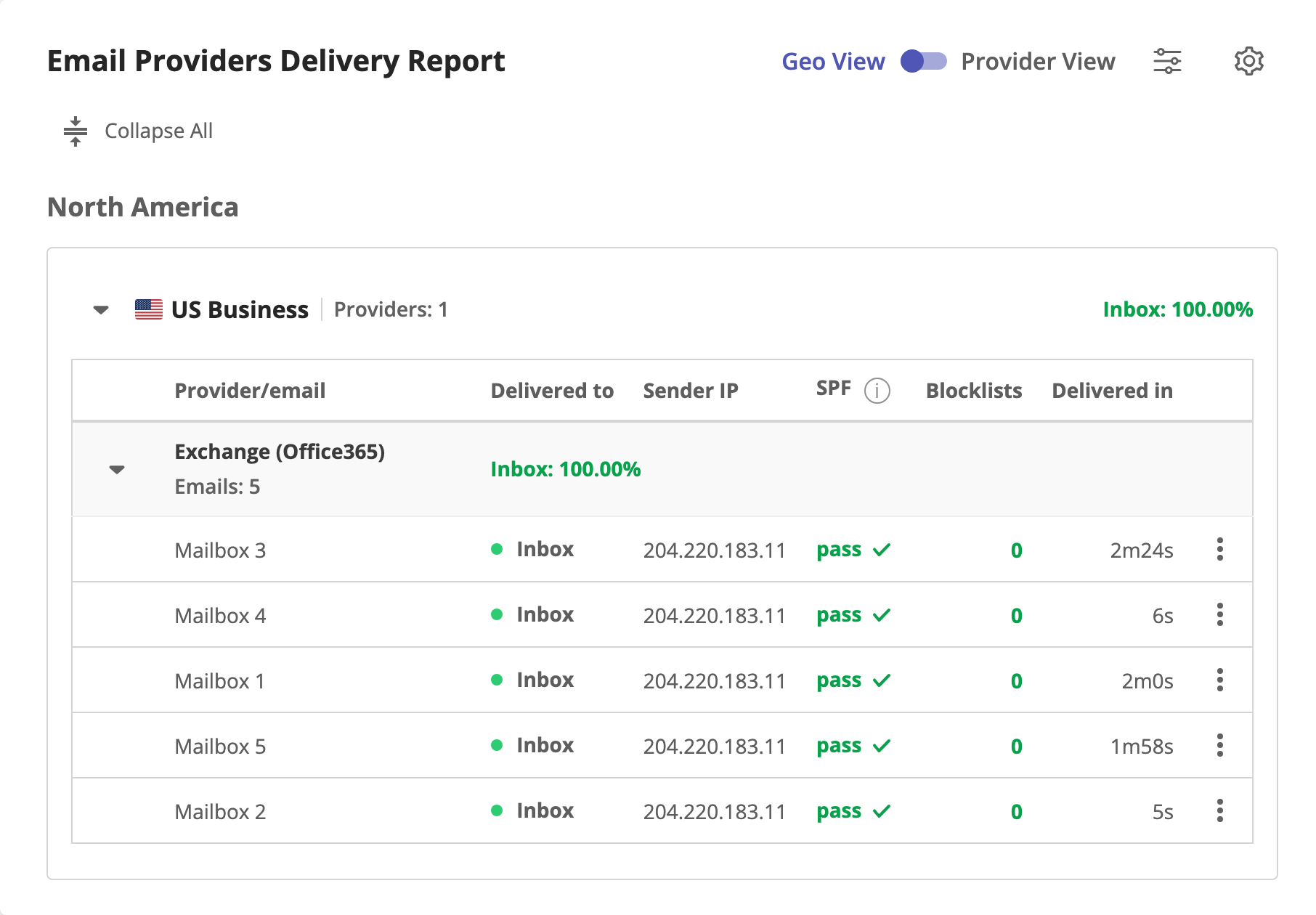
Microsoft documents a Safe Links setting, Wait for URL scanning to complete before delivering the message, that holds messages with URLs until scanning is finished. The pattern we observed is consistent with that setting. We didn’t have the seed tenants’ policy settings or Microsoft’s scan-completion timestamps, and Inbox Insight’s delivery time is the difference between the message’s Date header and its top Received header, not the moment it appeared in the mailbox.
Thirteen of the 14 Exchange Online copies with observed link requests landed in the inbox, and one in spam. All 16 copies without observed requests landed in the inbox. This seed test doesn’t establish whether scanning affects placement.
Image fetches can inflate open counts
Google’s image proxy loaded the image in 60 of 62 HTML copies sent to Gmail and Google Workspace seeds, most of them within one or two seconds of delivery, and in all three sent to the Google Spam Filter seed. Proton’s proxy did the same for its three HTML copies. If you count opens by image loads, these show up as opens at delivery time.
What to check
- Change state only on an explicit action. Confirm a subscription or an address with a button that sends a POST. A page load, or a script that runs on load, shouldn’t change anything (RFC 9110 defines GET as a safe method). Reloading the page after a real confirmation can show “you’re confirmed”.
- Implement one-click unsubscribe as RFC 8058 describes. Put an HTTPS URL in List-Unsubscribe, add List-Unsubscribe-Post: List-Unsubscribe=One-Click, sign both headers with a valid DKIM signature, and unsubscribe on that POST directly, without a further click. The footer link should open a page with an Unsubscribe button. Gmail and Yahoo require one-click unsubscribe for bulk marketing and subscribed messages (RFC 8058, Gmail sender guidelines, Yahoo Sender Hub).
- Treat sign-in links and invitations the same way. The link opens a page; the sign-in or acceptance happens on an explicit action that checks the token for its purpose. A link that was already used shouldn’t grant access again.
- Read click metrics with automated fetches in mind. Suspect an automated fetch when several links from the same message are requested nearly together, soon after SMTP acceptance. Treat this as a signal when interpreting click metrics.
- Read image-based opens the same way. Proxy fetches at delivery time aren’t someone reading the email.
- Compare delivery times across repeated tests. Pre-delivery URL scanning is one possible explanation for a slower Exchange Online result.
Conclusion
In this seed test, automated requests to our test links came from Microsoft’s network and were tied to copies sent to Microsoft 365 business seeds. The scanner used up short confirmation links, triggered confirmations on page load, and activated the footer unsubscribe in both newsletter copies it checked. Neither button-based confirmation was triggered in the four copies that carried them. The scanner visited the one-click unsubscribe URL in both newsletter copies without submitting a POST to that endpoint. The data from all six runs is public, without seed addresses.
FAQ
At Microsoft 365 business recipients, an automated link check is a likely cause. In our test, links in copies sent to Microsoft 365 business seeds were requested from Microsoft’s network, several at a time; the first request to a link in each checked copy came 16 to 57 seconds after SMTP acceptance. We saw no such requests from the other providers’ seeds.
We saw no requests to our test links from Gmail or Google Workspace seeds in the four runs that included them. Google’s image proxy did load the images within seconds of delivery, which can count as an open.
If the subscriber is on Microsoft 365, an automated check may have opened it first. In our test, a short confirmation link that acted on a visit was triggered in 15 of 15 checked copies, and a page that confirmed by script as it loaded in 17 of 17. Button-based confirmations weren’t triggered.
It triggered our test unsubscribe in both newsletter copies it checked, through a footer link that unsubscribed on a plain visit. It also fetched the List-Unsubscribe URL, but sent no POST to it, so the endpoint that acted only on POST was left alone.
In our test, Exchange Online copies whose links were fetched showed 64 to 206 seconds in Inbox Insight, and the other copies in the same mailboxes showed 3 to 13 seconds. That’s consistent with Microsoft’s documented Safe Links setting that holds a message until its URLs are scanned, though we couldn’t see the seed tenants’ settings.
Look for several links from one message requested nearly together, soon after SMTP acceptance, and treat that as a signal, not proof. A real reader can click quickly too.
Limitations
- Seed mailboxes don’t click. We saw requests that reached our server after SMTP acceptance. Reputation checks that don’t fetch the URL, checks at the time of a click, and rewritten links in the delivered message weren’t visible to us.
- GlockApps’ tenants. The Microsoft 365, EOP, Proofpoint, and Barracuda seeds run the policies their owners set. Real organizations may check more or less.
- Small samples. Five Exchange Online seeds and one EOP check. The buttons come from four scanned copies, the unsubscribe links from two: the short newsletter of run l6 was checked in two of the six Microsoft 365 business seeds.
- A new link host with no history and a test message full of links, some hidden, may draw more checks than an ordinary newsletter.
- Delivery time in Inbox Insight comes from the message’s headers. It isn’t the moment the message appeared in the mailbox.
- The watch. We watched the server until 22 November, three to six days after each run. Every request with a test token arrived within 90 seconds of delivery, and none came later. A check that comes back after a longer gap wouldn’t be in our data.
Related Posts
Who but marketers knows how incredibly difficult it is to get promotional emails into the main Outlook inbox? According to Read more
DKIM has been a core part of email authentication for almost two decades. It allows receiving servers to verify that Read more
An e-receipt is one of the few emails customers actively expect after making a purchase. They may need it to Read more
A damaged email domain reputation can take weeks to recover, even after you've corrected the problem that caused it. Emails Read more