Return Path Email Header Explained

Estimated reading time: 10 minutes
When a recipient’s mail server rejects an inbound email, where does that message go? Does it just disappear or does it go back to the sender?
Sometimes, it just disappears in the Internet back hole, but in most cases the rejected message is returned to the sender with a non-delivery report (NDR).
NDRs are sent to provide useful information about the cause of a message rejection in order for the sender to be able to remove an invalid recipient’s email address or make corrections in their email configuration.
In this article, I examine what the Return Path email header is, how to find it in different email clients, and how it aligns with SPF and DMARC. Let’s take a closer look.
What is a Return Path?
As a rule, NDRs are sent to the specific email address designated to handle bounce messages. This email address is located in the Return-Path: header field. The Return Path email address is also referred to as a Mail FROM address, Bounce Email Address, or Envelope From email address.
For example, if you are sending emails from newsletter@example.com, the Return Path email address would be something like bounce@example.com.
Quick Comparison: Return Path vs. From Address vs. Reply-To
A Return Path email address should be differentiated from a Header From email address and a Reply-To email address.
A Header From or From email is the email address the recipient sees in their From: email field when the message is delivered.
A Reply-To email address is the email address where the email readers’ replies go if they click “Reply.”
A Return Path email is destined to only receive bounce messages and is not available in a visual part of the email.
In the table below, I’m sharing a quick comparison of the From, Return Path, and Reply-To email addresses by their accessibility, purpose, impact on deliverability, and sender’s configuration.
| Feature | Return Path (Envelope From) | Header From (Display From) | Reply-To |
| Visibility | Hidden in the email source headers | Visible to the recipient in their inbox | Visible when the recipient clicks “Reply” |
| Primary Purpose | Routing bounce messages and NDRs | Identifying the sender to the recipient | Directing manual human responses |
| Deliverability Impact | Critical. Used for SPF and DMARC alignment | High. Impacts brand trust and DMARC | Low. Mostly affects user engagement |
| Set By | Mail Transfer Agent (MTA) or ESP | Email client or sender’s settings | Sender’s settings (optional) |
| Example | bounce@bounces.example.com | newsletter@example.com | support@example.com |
How to Find the Email Return Path in Different Email Clients
As I mentioned above, a Return Path email is not visible when a message arrives in the mailbox. But it can be found in the email source. Read below about how to view the Return Path email header in different email clients.
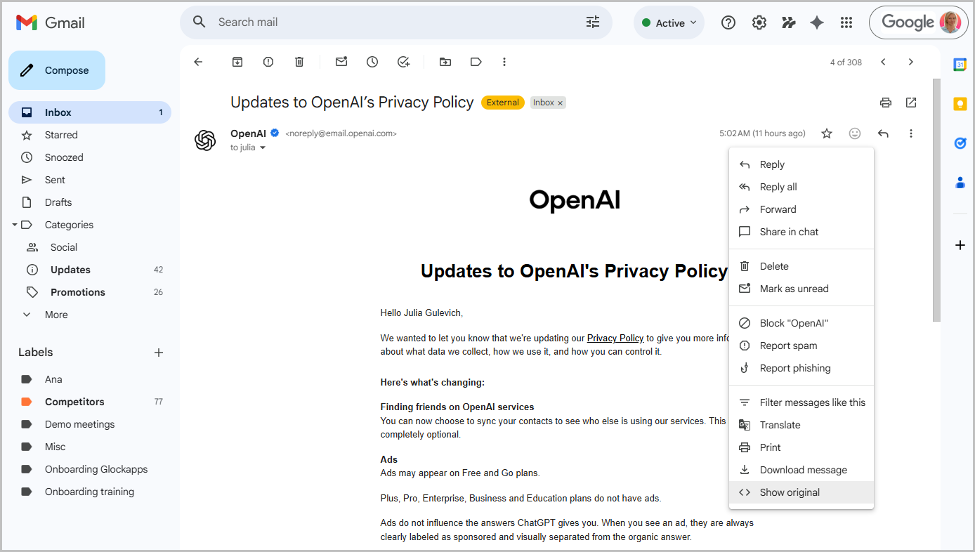
Viewing Return Path in Google
Open the message and click on the More menu at the top right. Select “Show Original.”
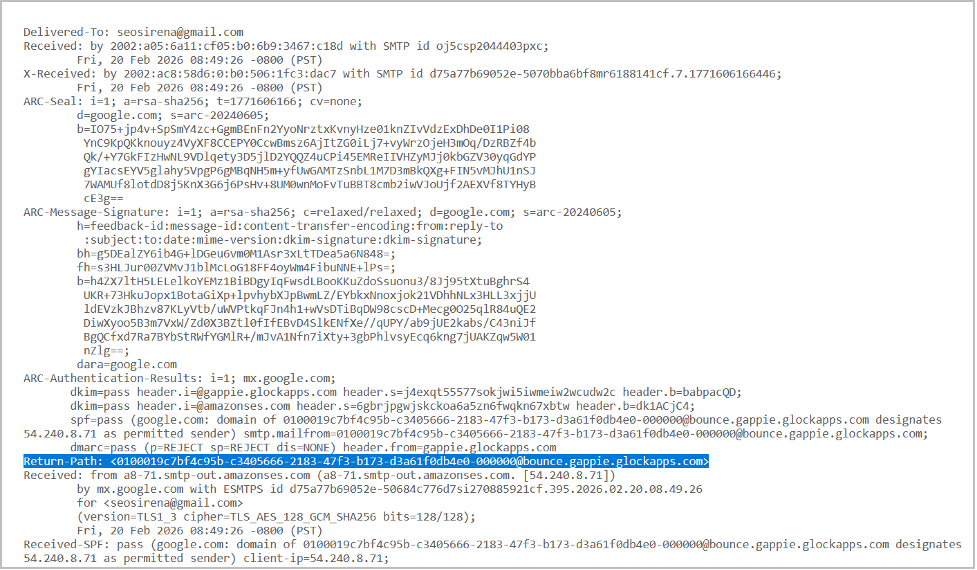
The RAW message will open in a new tab. Scroll down to find the Return-Path: header field. Locate the email address used in this header.
Viewing Return Path in Outlook
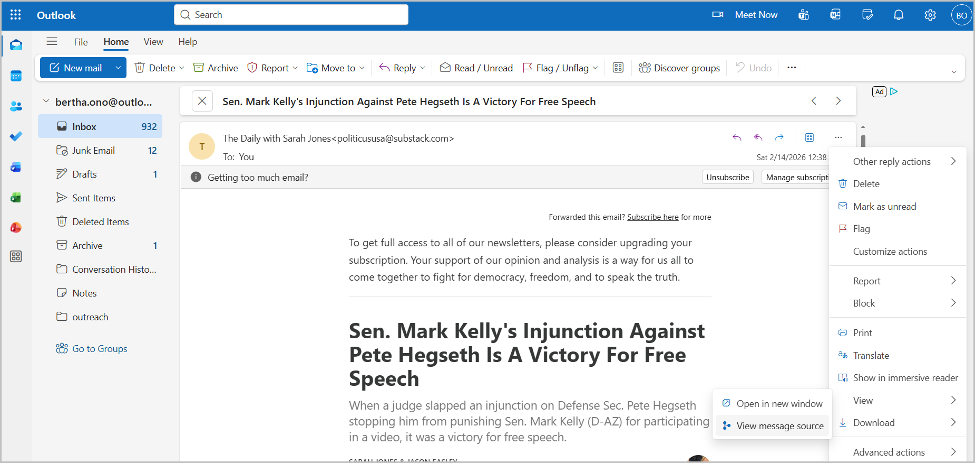
Open the email you want to examine and click on the More Actions menu at the top right.
Click View > View Message Source.
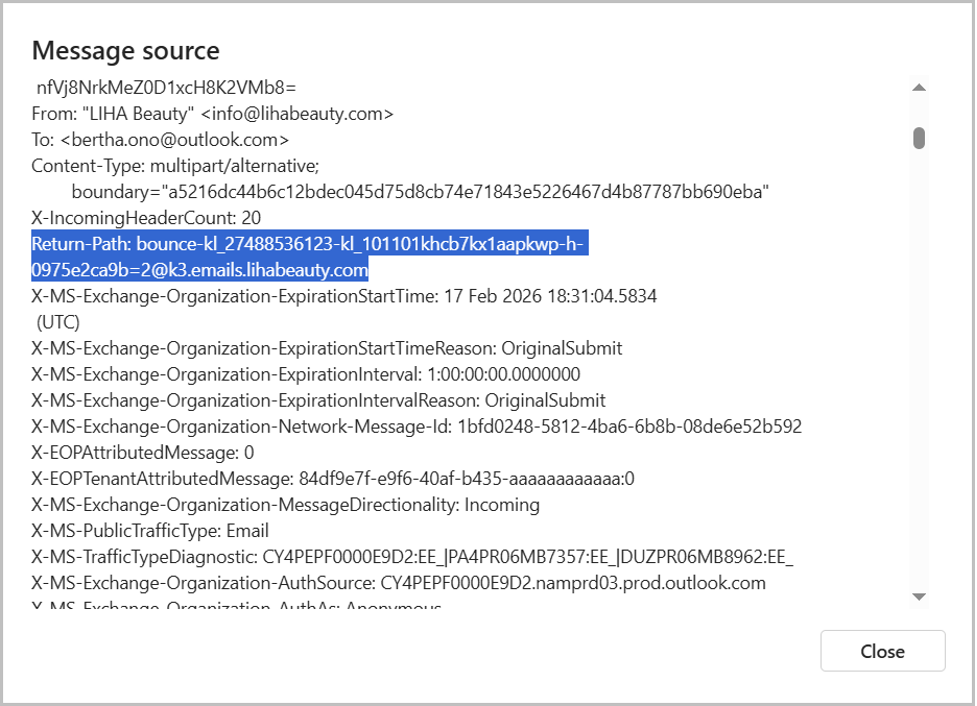
The message source will open in a new window. Scroll down and locate the Return-Path: header field.
Viewing Return Path in AOL
Open the message and click on the More menu at the top. Select “View raw message”.
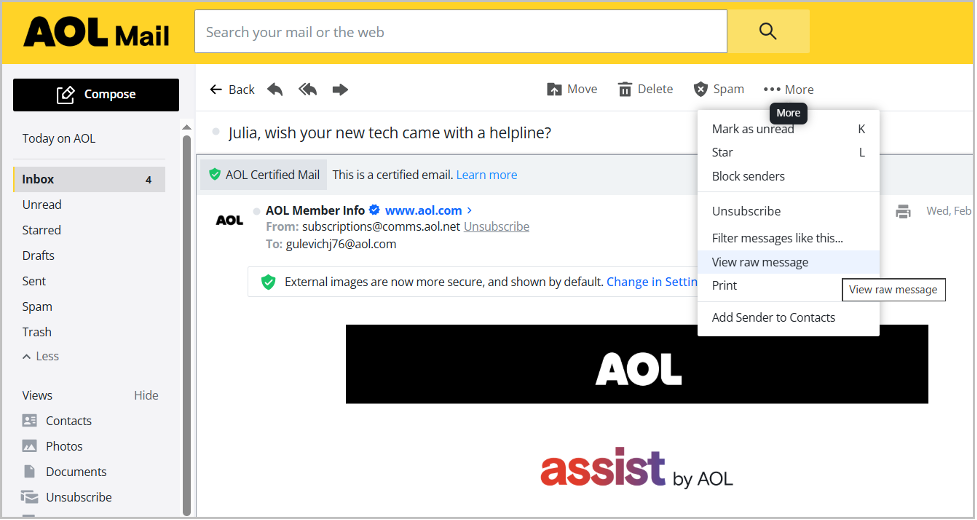
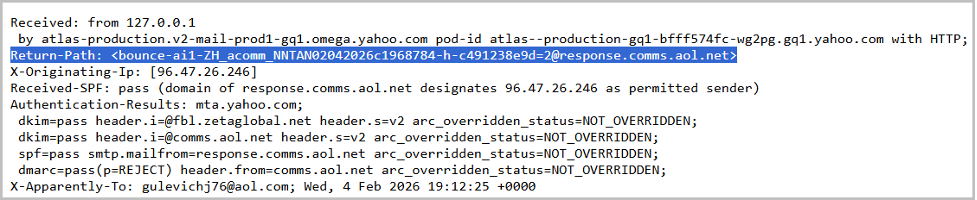
The RAW message will open in a new tab. Scroll down to locate the Return-Path: header.
Why Is the Return Path Email Important?
The Return Path email address plays a significant role in email delivery. It’s important to have a valid and monitored email address in the Return-Path for these reasons:
1. Non Delivery Reports: Hard Bounce vs. Soft Bounce.
Monitoring the Return Path isn’t just a technical task; it’s a critical part of maintaining your sender reputation. When an email fails to deliver, the NDR sent to your Return Path will usually indicate one of two types of bounces:
Hard Bounce: Indicates a permanent delivery failure. Permanent delivery errors have codes starting with 5 (5xx). A hard bounce happens when the recipient’s email address is invalid, deleted, or simply doesn’t exist.
Action: You must remove these addresses from your list immediately. Continuing to send to “hard bounce” addresses is a major red flag for ISP filters.
Soft Bounce: Indicates a temporary delivery failure. Temporary delivery errors have codes starting with 4 (4xx). A soft bounce occurs when the recipient’s mailbox is full, the server is momentarily down, or the message size is too large.
Action: These addresses can stay on your list, but they should be monitored. If an address “soft bounces” several times in a row, it’s best practice to treat it as a hard bounce and suppress it.
By capturing these reports through your Return Path, you can automate your list hygiene, ensure you’re only sending to active, valid users, determine email configuration issues, and problems with the sender reputation.
2. SPF Email Authentication.
The domain used in the Return Path email address is considered a sending domain. This is where email receivers check the SPF record in order to authenticate the email by SPF.
3. SPF Alignment.
SPF alignment matches the domain used in the email Return Path header to the domain used in the Header From field. If the domains match, the SPF alignment test passes. Two alignment modes are available:
- Relaxed (default): only the organizational domains in the two fields must match;
- Strict: the exact match of the domains is required in order for the email to pass the SPF alignment test.
The SPF alignment mode is set in the aspf= tag in a domain’s DMARC record. If there is no such a tag in the record, the default relaxed mode is applied.
4. DMARC Authentication.
DMARC is an email authentication mechanism that ensures the message authenticity and enables domain owners to define policies for message treatment and reporting. DMARC uses the results of the SPF alignment and DKIM alignment tests to authenticate the email.
When an email is received, the server performs two key checks:
- Whether the message passes DKIM and/or SPF authentication.
- Whether the authenticated domain aligns with the domain in the “Header From” field. The specified alignment mode is taken into account.
Based on the results, the message passes or fails DMARC authentication.
Most of the time, an email passes a DMARC test based on DKIM alignment when the domain used in a DKIM signature matches the Header From email domain.
How to Set up a Custom Return Path Domain
By default, the majority of email service providers use their Return Path domains in order to receive and handle bounce emails.
However, some email services allow the configuration of the sender’s custom domain for the Return Path header.
Typically, this requires setting up a specific Return Path domain in your organization and confirming it by adding a matching CNAME record to your DNS configuration.
For example, if your From domain is @example.com, a Return Path domain could be something like @bounce.example.com. In your DNS management console, you would set up a CNAME record for bounce.example.com.
I would suggest reaching out to your email service provider and working with them on a custom Return Path domain configuration.
What is a Variable Envelope Return Path?
A Variable Envelope Return Path (VERP) assigns the unique Return Path email address to each recipient on your email list.
Here’s why this matters: although bounce notifications are sent to your Return Path address, they don’t always include the recipient’s actual email address.
For example, a bounce message might say, “Your message wasn’t delivered to John Doe because their email address doesn’t exist.” While this explains the reason for the failure, it doesn’t reveal the specific email address that doesn’t exist.
Without that information, you can’t accurately remove invalid contacts from your list. Over time, repeatedly sending emails to nonexistent addresses leads to more bounces, which gradually harms your sender reputation.
VERP solves this problem by embedding the recipient’s address into the Return Path itself. When a bounce occurs, you can immediately identify which email address failed and automatically suppress or remove it from your list.
For example, instead of using a standard address like bounce@bounce.example.com,
the VERP version would look like bounce+john.doe=johndoe.com@bounce.example.com.
Because an email address can contain only one “@” symbol, the “@” in the recipient’s address is replaced with an equals sign (=).
This approach makes it clear exactly which email address caused the bounce and enables automatic bounce processing and tracking.
Most popular mail transfer agents (MTAs), including Exim, Postfix, qmail, and Sendmail, support VERP. Some email service providers (ESPs) offer this functionality as well.
How to Monitor the Return Path Email Domain in GlockApps
Considering the importance of Return Path domain for email deliverability, I would highly recommend monitoring the Return Path domain and SPF authentication of the emails.
With the GlockApps tools, you get visibility on what Return Path domains are used for your emails, if SPF authentication passes, and how your Return Path aligns with Header From.
The GlockApps DMARC Analyzer handles the DMARC reports created by email receivers and gives you insightful information about your emails:
- SPF authentication result;
- Return Path domain (referred to as SPF Domain);
- Header From domain;
- SPF alignment, DKIM alignment;
- DMARC test result.
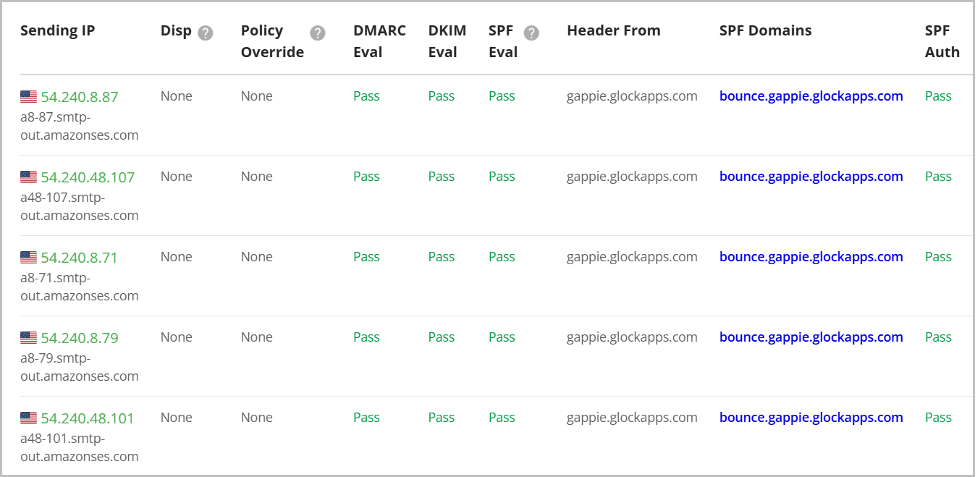
The tool can send you alerts on significant changes in your SPF or DMARC compliance ratio – no issue stays unnoticed.
Conclusion
To recap, I’m sharing the key takeaways regarding the Return Path email header:
- The Return Path email address captures the non-delivery notifications;
- The Return Path email address can be viewed in the message headers;
- The Return Path header is added by the SMTP server and uses the email address provided by the ESP;
- Senders can customize the Return Path domain by adding a CNAME record to DNS in order for the emails to pass SPF alignment;
- The Return Path domain matters for SPF authentication, alignment, and DMARC;
- A Variable Envelope Return Path supported by MTAs and some ESPs ensures an easy identification of invalid recipients’ email addresses;
- A properly configured Return Path helps to avoid email deliverability issues;
- Monitoring of Return Path and email authentication is made easy with GlockApps.
Related Posts

Every day, organizations receive thousands of emails containing attachments, links, and embedded scripts. While most of them are harmless, some Read more

If you work in email marketing or manage outbound infrastructure, sooner or later you’ll run into a blacklist issue. One Read more

HTML emails can be powerful, visually engaging, interactive, and conversion-driven. But they can also break, land in spam, or render Read more

Over the past year, I’ve watched inbox experiences change more dramatically than at any point in the last decade. What Read more