How to Test Transactional Email Deliverability
Estimated reading time: 4 minutes
A transactional email is an automated email message triggered by a specific user behaviour on a website or in an application. Examples of transactional emails include account registration confirmations, password resets, subscription confirmations, welcome emails, billing information updates, etc.
A transactional email contains no marketing material. Its purpose is to deliver highly important personal information instead of driving sales.
Why Test Deliverability of Transactional Emails
Transactional emails are typically short messages with a simple design. However, this doesn’t make them invulnerable to spam filters or technical issues. Phishing emails often masquerade as legal transactional messages making spam filters scrutinize all inbound emails regardless of their type.
Transactional emails are very time sensitive by their nature. People expect them in their inboxes almost instantly after taking an action.
Transactional emails often create the first impression about the company. Delivered in Spam, a transactional email may stay unnoticed – hence, a failure to deliver urgent information, a broken user experience, and a missed opportunity to convert users into customers in the future.
When Deliverability of Transactional Emails Should Be Tested
Even minor changes can make a difference. A routine testing of transactional emails, on a weekly basis for instance, will ensure that people will receive them in the inbox in a timely manner. Additional testing is needed in particular cases:
- When a new transactional email template is introduced in a workflow;
- When you switch an email service provider or change the process of sending transactional emails;
- When you change the email address, domain or IP address sending transactional emails;
- When you update DNS records (SPF, DKIM, DMARC);
- When your clients report to you that they don’t receive transactional emails from your company in their inboxes.
How to Test Deliverability of Transactional Emails
A typical email testing process requires the insertion of a unique code in an email and sending the email to a group of test email addresses. But transactional emails are typically sent via API or SMTP directly from the service code when a triggering event occurs. This makes a normal testing process unsuitable for transactional messages.
However, the GlockApps Inbox Insight tool provides a workaround – testing via one proxy email address. Here is how it works in detail:
- Create a sending account.
Connect GlockApps with your email account. This takes a few mouse clicks if you have a Google or Outlook email account. The integration with other email service providers can be done by entering the SMTP settings manually. - Generate a proxy email address.
A proxy email address is unique for each sending account. For security reasons, it is suggested to re-generate a proxy email from time to time.
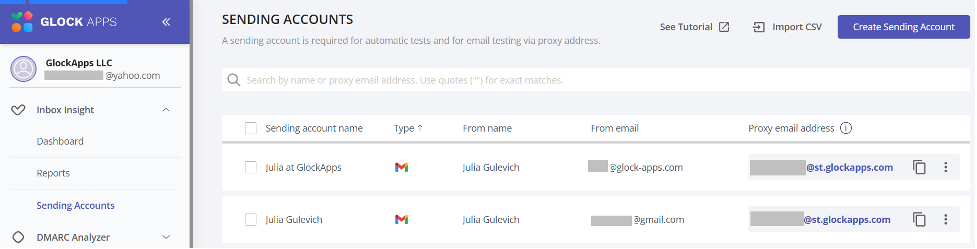
- Send a transactional email to the proxy address.
After receiving a transactional message at the proxy address, GlockApps initiates sending the message to a test list via your email account. - View a deliverability report.
The test is created in Reports > Smart Tests. Click on the message Subject line to view the full report.
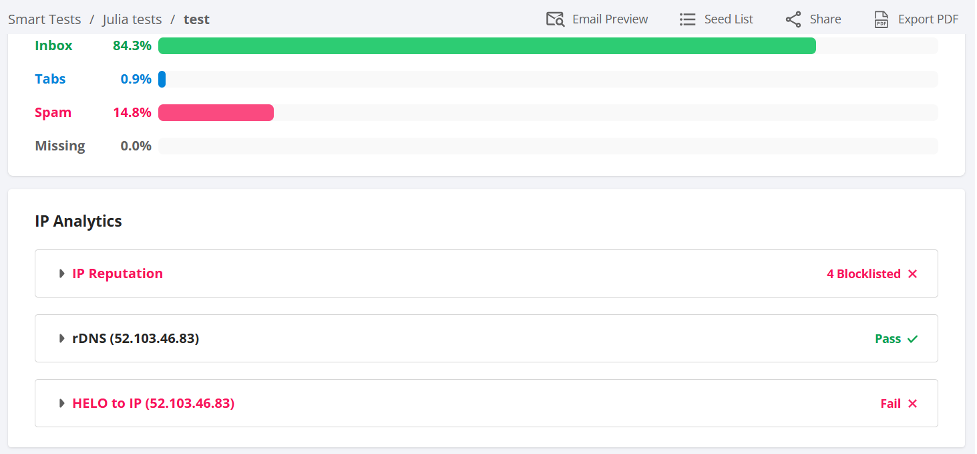
GlockApps returns a lot of useful information:
- IP analytics (status of the sending IPs with blacklists);
- rDNS, HELO to IP results;
- Domain analytics (status of the domains used in the email with blacklists);
- Email spam score with Google Spam Filter, Microsoft Online Protection, Barracuda, SpamAssassin, and Proofpoint;
- Email placement results: Inbox, Promotions, or Spam;
- Action steps for content optimisation and higher Inbox rate.
Additionally, GlockApps allows automating transactional email testing. You can schedule the tests to be triggered every one, three or seven days in order to catch deliverability issues and fix them in time.
Related Posts

Putting a lot of effort into creating a newsletter, but not seeing significant results? Your click-through and reply rates are Read more
Images can be the emotional core of an email campaign. They announce product launches, highlight seasonal promotions, create visual hierarchy, Read more

Open your inbox on any random morning and you’ll see it: a flood of emails shouting for attention. Discounts, announcements, Read more

Email deliverability is a constant battle for marketers and businesses. Even if your message is legitimate, beautifully written, and full Read more