Is Your Domain Listed on SURBL? Here’s How to Remove It
Estimated reading time: 6 minutes
If you work in email marketing or manage outbound infrastructure, sooner or later you’ll run into a blacklist issue. One name that often raises questions is SURBL.
Over the years, I’ve seen how confusion around SURBL leads to panic: “My IP is blacklisted!” In reality, SURBL works a bit differently than many traditional DNSBLs. In this article, we’ll talk about what SURBL actually is, how it works, how to check whether you’re affected, and how to fix the issue in four clear steps.
Key Takeaways
- SURBL primarily lists domains, not just IP addresses.
- If your links are flagged, your deliverability can drop even if your IP is clean.
- Always diagnose whether the issue is IP-based or domain-based.
- Fix the root cause before requesting delisting.
- Ongoing monitoring prevents relisting.
What Is SURBL?
SURBL (Spam URI Realtime Blocklists) is not primarily an IP blacklist. It is a domain-based blocklist.
It focuses on URLs and domains found inside email messages, not on the sending IP itself.
In simple terms:
- Traditional DNSBLs list sending IP addresses.
- SURBL lists domains that appear in spam messages.
If your domain (or a domain you link to) appears in spam campaigns, it can be added to SURBL. Mail servers that use SURBL can then filter or reject emails containing those listed domains.
This is a critical distinction. Many people search for “SURBL IP blacklist,” but technically, SURBL’s core function is to block spam-related domains.
How SURBL Works
SURBL operates as a DNS-based blocklist (DNSBL). Here’s how the filtering logic typically works:
- An email arrives at the receiving mail server.
- The server extracts all URLs/domains from the message body.
- The server queries SURBL’s DNS zones.
- If any domain in the email matches a listed domain, filtering rules are triggered (spam placement or rejection).
SURBL does not analyze message content emotionally or contextually. It simply checks whether any included domains have been associated with spam.
This means that even if your sending IP is clean, your emails can be filtered if:
- Your tracked links are compromised
- A third-party link shortener is abused
- Your own domain was used in a spam campaign
How SURBL Affects Deliverability
SURBL-related issues typically cause:
- Increased spam placement
- Temporary message rejections
- Lower inbox placement rates
- Sudden engagement drops
Because SURBL focuses on domains inside emails, the impact is often misunderstood. You might rotate IPs, change ESPs, or adjust authentication and still see problems because the domain in your links is the real issue.
This is why I always analyze both IP reputation and domain reputation separately. Tools like GlockApps help check inbox placement and detect blocklist-related filtering signals early, before engagement metrics collapse.
How to Check If You’re Listed on SURBL
You can verify domain status directly through SURBL’s lookup system. Since SURBL is domain-based, you typically check:
- Your sending domain
- Your tracking domain
- Any redirect domains used in your emails
Here’s a simple process I follow:
- Identify all domains used in your email campaigns.
- Use a DNS-based lookup tool or SURBL’s official check interface.
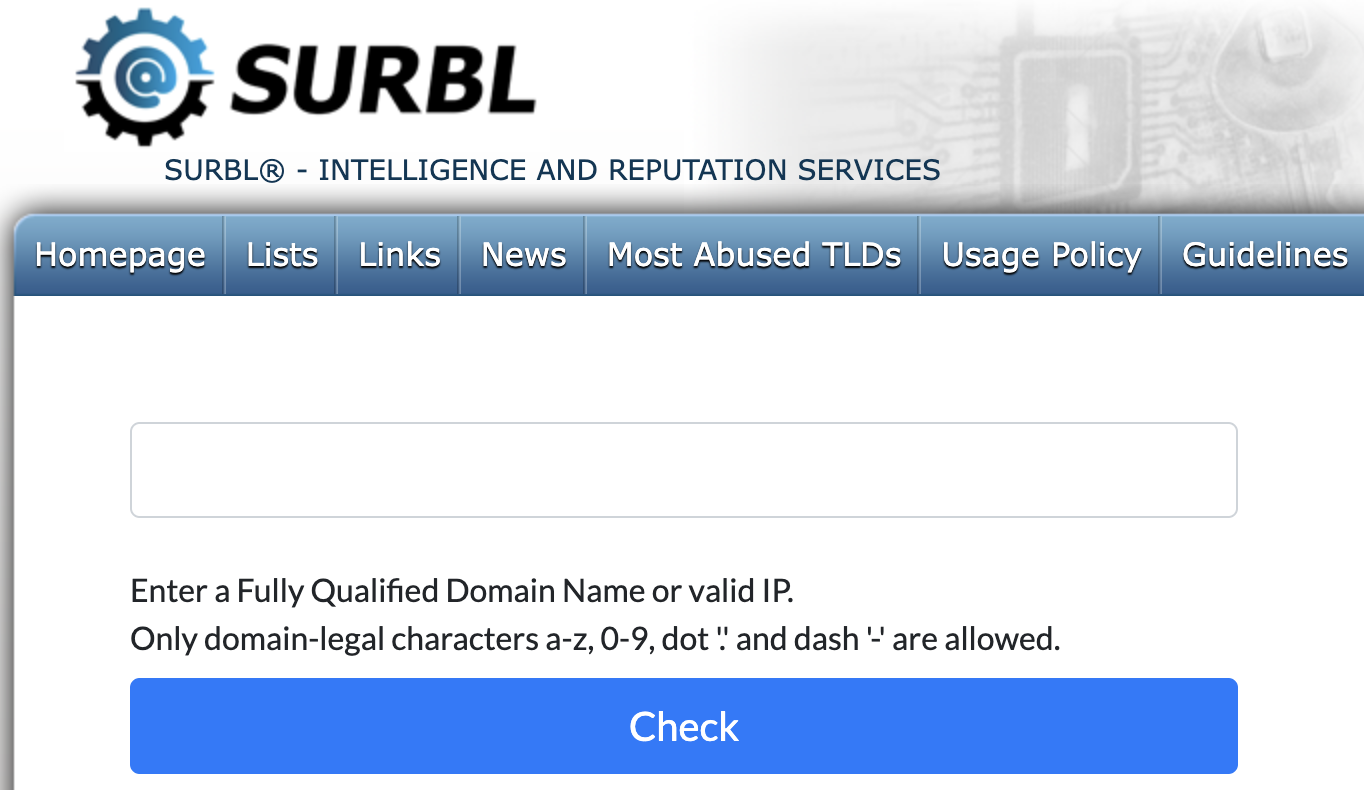
- Query the domain against SURBL zones.
- Review whether it returns a positive listing response.
It’s important to note again: SURBL listings are about domains, not just IP addresses. If you’re unsure whether filtering is IP-related or domain-related, I usually run a deliverability test to isolate the variable before taking action.
How To Delist Your IP (or Domain) from SURBL in 4 Steps
Since SURBL primarily lists domains, these steps focus on domain remediation.
Before jumping into the details, here’s a quick overview:
| What You Need To Do | Why It Matters |
| Identify the listed domain | Prevent misdiagnosis |
| Stop the abuse source | You fix the root cause |
| Secure infrastructure | Prevent relisting |
| Submit a delisting request | Request review after cleanup |
How To Delist Your Domain from SURBL: Quick Overview
Now let’s go deeper:
Step 1: Identify the Exact Listed Domain
Do not assume the problem is your IP.
Check:
- Main sending domain
- Subdomains
- Tracking links
- Redirect URLs
- Affiliate or partner URLs
If only one tracking subdomain is listed, you may not need to overhaul your entire system.
Step 2: Stop the Source of Abuse
SURBL listings typically occur because a domain was:
- Used in spam campaigns
- Compromised
- Hosting malicious or deceptive content
You must:
- Remove malicious content
- Disable compromised scripts
- Rotate or rebuild tracking links
- Terminate abusive affiliates
Without eliminating the root cause, delisting will fail, or the domain will be relisted.
Step 3: Secure Your Infrastructure
After cleanup, strengthen your setup:
- Enforce strong authentication (SPF, DKIM, DMARC)
- Restrict access to link generation systems
- Monitor outbound campaigns
- Use dedicated tracking domains
- Audit third-party integrations
This is also where I recommend running deliverability monitoring through tools like GlockApps to verify that filtering issues are resolved across major mailbox providers.
Step 4: Submit a Delisting Request
Once you are confident the issue is fixed:
- Visit SURBL’s official site.
- Follow their removal request procedure.
- Provide accurate remediation details.
- Wait for review and response.
Be transparent and factual. If your domain was compromised, say so and explain how you fixed it. SURBL evaluates based on whether the abuse risk is resolved.
Conclusion
Most SURBL-related panic comes from misunderstanding how it works. It’s not just about “my IP is blacklisted.” It’s about whether domains inside your emails are associated with spam activity. When you approach the issue methodically (identify, clean, secure, request review), resolution is very achievable.
Deliverability is not just about sending emails. It’s about protecting your entire ecosystem: IPs, domains, links, and reputation. And the earlier you detect issues, the easier they are to fix.
FAQ
SURBL (Spam URI Realtime Blocklists) is a domain-based blocklist. It lists domains and URLs that appear in spam emails. It does not primarily block sending IPs; it blocks domains found inside email messages.
It depends on the case. After submitting a removal request and proving the issue is fixed, review times can vary. Acting quickly and providing clear remediation details helps speed up the process.
Yes. If the same abuse happens again, SURBL may relist it. Ongoing monitoring and proper security practices are essential to prevent repeat issues.
Not necessarily. Since SURBL mainly targets domains, changing your IP may not solve the problem. Always confirm whether the issue is domain-related before making infrastructure changes.
Related Posts

When you run an email test with GlockApps, oftentimes you may be frustrated by a warning that your sending IP Read more

Our email inbox often acts as the hub of our online lives: financial alerts, social accounts, work communications, and personal Read more

Email is one of the most effective ways to communicate today. You can be sharing a business update, sending out Read more

Deliverability depends not only on strong content and engaged subscribers but also on the technical foundation of how your messages Read more