Gmail vs Yahoo Mail: Features, Security, and Deliverability Compared

Estimated reading time: 7 minutes
Choosing an email provider today is about much more than sending and receiving messages. Email platforms have evolved into complex ecosystems of cloud storage, productivity tools, AI features, and security layers. Two of the biggest giants, Yahoo Mail and Gmail, continue to dominate this landscape, yet they offer distinctly different user experiences, priorities, and strengths.
1. Interface & User Experience
Gmail: Clean, Efficient, and Built for Speed
Gmail is built around minimalism and productivity:
- A simple, uncluttered design that emphasizes speed
- Labels instead of folders for more flexible organization
- Automatic inbox tabs (Primary, Social, Promotions) to reduce noise
- Fast, powerful search — one of Gmail’s greatest strengths, able to find obscure messages within seconds
- Contextual actions, smart replies, and smart compose powered by AI
Gmail feels lighter, faster, and more modern for work, multitasking, and high-volume communication.
Yahoo Mail: Visual, Traditional, and Personalizable
Yahoo Mail appeals to users who appreciate a more traditional, folder-oriented experience. Its interface:
- Leans toward a bright, colorful design
- Allows extensive customization with themes, background images, and layout options
- Uses a folder system familiar to long-time email users
- Includes Smart Views that automatically group messages by content type (e.g., photos, documents, purchases)
Yahoo Mail feels expressive and user-friendly, especially for personal inboxes or users who enjoy visual organization.
2. Storage & File Management
Gmail: Balanced Storage With Cloud Flexibility
Gmail includes:
- 15 GB of free storage shared across Gmail, Google Drive, and Google Photos
- The ability to upgrade storage easily via Google One
- Tight integration with Drive for large attachments and collaborative documents
Although Gmail’s free storage is small, its ecosystem makes file management more flexible and collaborative.
Yahoo Mail: Storage Advantage Narrowed
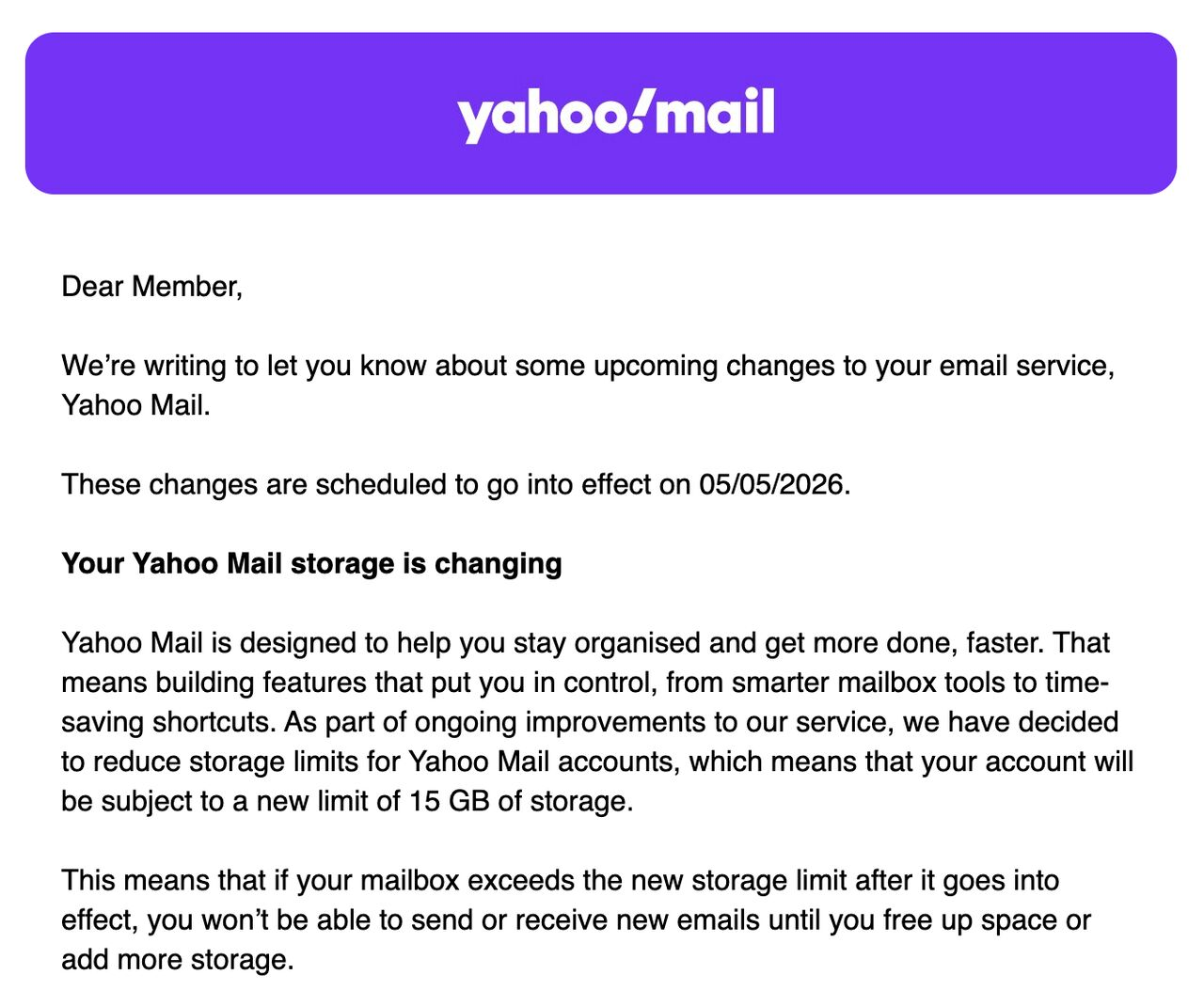
As of May 5, Yahoo Mail provides:
- 15 GB of free mailbox space
In the past, Yahoo stood out by offering more storage than Gmail. But with the latest update reducing free space from 20 GB to 15 GB, Yahoo no longer has a clear edge. Both services now match at 15 GB.
3. Security & Privacy
Security is one of the most important considerations when choosing an email provider.
Gmail Security
Gmail is widely considered one of the most secure free email services because of:
- Highly advanced spam and phishing detection powered by machine learning
- Regular security updates and strong protection against new threats
- Two-factor authentication, login alerts, and suspicious activity monitoring
- Minimal history of major breaches in recent years
- Encrypted connections and reliable authentication tools
Gmail also benefits from Google’s massive investment in cybersecurity research.
Yahoo Mail Security
Yahoo Mail offers standard modern protections, including:
- Two-factor authentication
- Suspicious activity alerts
- Automatic spam and phishing detection
- Encryption for data in transit
While Yahoo Mail’s past breaches once damaged trust, the platform has rebuilt itself with far stronger security practices. For everyday use, it remains perfectly safe, though Gmail maintains a stronger reputation in this category.
4. Productivity Features & Integrations
Gmail: A Full Productivity Ecosystem
Gmail is deeply integrated with Google’s suite of tools:
- Google Calendar: schedule events directly from emails
- Google Drive: share documents without leaving the inbox
- Google Meet: start calls directly from Gmail
- Google Tasks & Keep: turn emails into actionable reminders
Additionally, Smart Compose and Smart Reply allow users to write faster, while search filters, labels, and AI-driven suggestions streamline workflow. For busy professionals, students, and anyone managing multiple projects, Gmail feels like a productivity hub.
Yahoo Mail: Useful Features With a More Personal Focus
Yahoo Mail includes:
- Smart Views for organizing messages
- A built-in inbox cleaner for newsletters and subscriptions
- A unified inbox for multiple email accounts
- Rich previews for media and purchases
These features make Yahoo Mail excellent for personal use, online shopping, and visually oriented users, though it lacks the deep connectivity that Gmail offers for work environments.
5. Mobile App Experience
Gmail App
- Simple and fast
- Powerful search on mobile
- Integrated chat and video calls
- Reliable performance on nearly every device
Yahoo Mail App
- Colorful, customizable interface
- Easy navigation
- Built-in tools to manage photos, attachments, and subscriptions
It’s a great choice for users who want a visually rich, intuitive mobile inbox.
Gmail’s mobile app is considered one of the best in the world thanks to its speed and integrations.
6. Deliverability & Email Marketing Considerations
If you send newsletters, work emails, or promotional messages, deliverability matters. Both Gmail and Yahoo Mail apply strict filtering rules to protect users from spam.
This is where tools like GlockApps become invaluable. By running inbox placement tests, you can see whether your messages land in:
- Primary inbox
- Promotions tab
- Spam folder
- Yahoo filtered folders
Understanding each platform’s filtering behavior helps you adjust your domain reputation, authentication (SPF, DKIM, DMARC), and sending habits. Marketers and businesses rely on GlockApps to detect deliverability issues early and keep engagement high.
Recent Q3 2025 deliverability statistics from GlockApps show that inbox performance varies significantly between mailbox providers, and this directly affects how well emails reach Gmail and Yahoo Mail users. According to the report, Gmail’s average inbox placement rate fell by 5.21% compared to Q2. In contrast, Yahoo Mail improved by 2.85%, showing greater stability during the same period. Outlook and Hotmail also experienced major gains, with inbox placement increasing by 10.09% and 10.80% respectively. These shifts highlight that even top providers fluctuate from quarter to quarter, reinforcing why regular monitoring with tools like GlockApps is essential for understanding how messages perform across Gmail, Yahoo, and other major inboxes.
7. Ease of Use for Personal vs. Professional Workflows
Gmail is ideal for:
- Students
- Remote workers
- Teams collaborating on documents
- Businesses
- Anyone who values speed, simplicity, and smart tools
Yahoo Mail is ideal for:
- Personal inboxes
- Users who enjoy visual customization
- Heavy email storage needs
- Photo- and attachment-heavy message histories
- Those who prefer folder-style organization
8. Search & Organization
Gmail: Unmatched Search Power
Gmail’s search engine feels almost like Google search: powerful, fast, and extremely accurate. It uses operators, filters, and indexing that dig through thousands of emails instantly.
Yahoo Mail: Good, but Not Google-Level
Yahoo Mail’s search has improved, but still can’t match Gmail’s precision. Filters and Smart Views help, but deep searches can take longer.
9. Ads & Monetization
Gmail
Gmail’s ads are more subtle and integrated into the Promotions tab rather than displayed as banners. The paid Workspace version removes ads entirely.
Yahoo Mail
Free Yahoo accounts display more visible ads, which can feel distracting for some users.
Which One Should You Choose?
Choose Gmail if you want:
- The fastest, cleanest interface
- Powerful search and smart tools
- Seamless integration with cloud productivity apps
- Excellent security
- A modern workflow for work or school
Choose Yahoo Mail if you want:
- A visually engaging experience
- Strong personal email organization
- An inbox that handles photos, purchases, and content well
Conclusion: Yahoo Mail or Gmail?
Yahoo Mail and Gmail both remain excellent choices, but they shine in different areas.
Yahoo Mail wins for users who value personalization, and a more expressive, traditional inbox. It’s great for digital collectors, casual users, and visually oriented workflows.
Gmail wins for users focused on productivity, organization, collaboration, and security. It offers a cleaner, faster experience and unmatched integration with tools people use every day.
The question isn’t which service is objectively better, it’s which service aligns with your habits, your workflow, and your digital lifestyle. And whichever platform you choose, Yahoo Mail or Gmail, keeping your email performance healthy is essential. Regularly checking how your messages land across different inbox providers can save you from sudden drops in engagement or unexpected filtering issues. Tools like GlockApps help you monitor inbox placement, sender reputation, and authentication health, ensuring your communication stays reliable no matter which service you use.
FAQ
Yahoo Mail is better for users who need massive free storage and a more traditional, customizable inbox. Gmail is better for productivity, speed, collaboration, and search.
Generally, yes. Gmail’s machine-learning spam filters and security infrastructure are considered state-of-the-art.
Yes. Yahoo Mail uses modern encryption and security practices. Past breaches have shaped public perception, but current security is strong.
Related Posts

When it comes to managing emails, most people find themselves comparing Apple Mail vs Gmail. Both platforms dominate the market, Read more

Gmail is the world’s most popular email service, but the introduction of the “Promotions” tab in 2013 was some sort Read more

Email deliverability is a constant battle for marketers and businesses. Even if your message is legitimate, beautifully written, and full Read more

Along with enforcing their sender requirements, inbox providers continue improving the client experience by offering new tools at their disposal. Read more