Does Gmail Unsubscribe Work? Implications for Marketers & Deliverability
Estimated reading time: 6 minutes
Does the Gmail unsubscribe feature work? The short answer is yes. The Gmail automated unsubscribe feature enables users to quickly opt out of mailing lists without searching for tiny footer links. Instead, Gmail detects legitimate unsubscribe mechanisms embedded in emails and surfaces a visible unsubscribe button in Gmail near the sender information.
This capability aligns with Gmail’s broader goals:
- Improving inbox usability
- Encouraging permission-based email practices
- Reducing spam complaints
- Rewarding compliant senders
But I can already see how this new feature will raise concerns about mass unsubscribing, deliverability, and reliability. In this article, we’ll explore the advantages of this feature and the main factors to consider.
Key Takeaways
- Gmail may display an unsubscribe button at the top of certain emails
- The feature relies on sender-implemented unsubscribe headers/links
- It helps users automatically unsubscribe from emails Gmail deems list-based
- Proper implementation improves trust and reduces spam complaints
- It is not a replacement for footer unsubscribe links, because both matter
What Does “Unsubscribe” Mean in Gmail?
When users ask, “What does unsubscribe mean in Gmail?”, my answer is simple:
Unsubscribing tells the sender to stop sending you a specific category of emails, typically marketing or subscription messages.
Important to note:
- It does not block the sender
- It does not delete previous emails
- It does not affect transactional or critical account messages
How Does Gmail Unsubscribe Work?
Gmail does not invent unsubscribe options on its own. It reads signals from the email itself.
When a sender correctly includes:
- A visible unsubscribe link in the body
- A List-Unsubscribe header (technical metadata)
Gmail may show you:
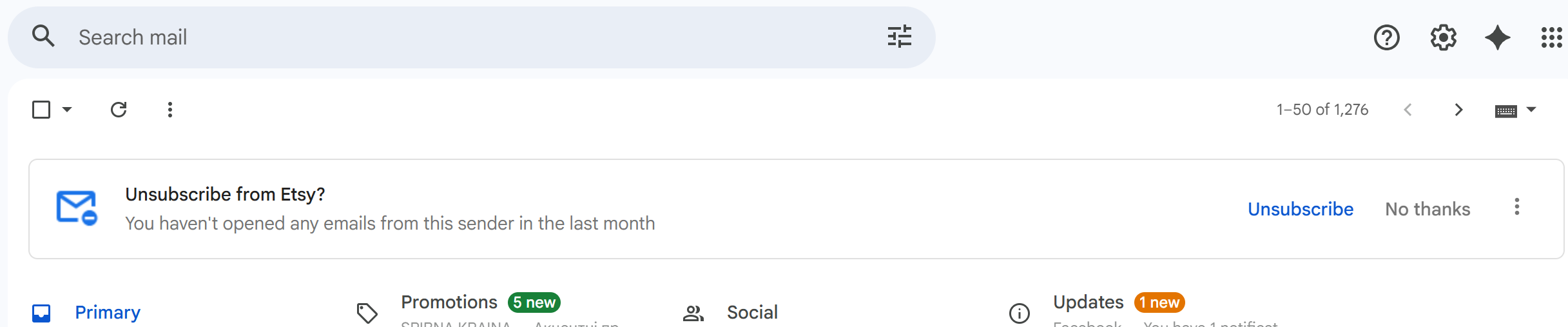
Gmail may show you: “Unsubscribe” next to the sender’s name or as a pop-up suggestion above the entire email thread. If you haven’t opened emails from a sender for around a month, Gmail may start suggesting the unsubscribe option. From my experience, this kind of encouragement does not always come at the right time. I don’t open emails from many senders, yet the unsubscribe option does not appear consistently and still seems quite selective. Perhaps the feature is still rolling out:
When clicked, Gmail can:
- Trigger the sender’s unsubscribe mechanism
- Send an automated request on behalf of the user
- Display confirmation feedback
This is why you can notice the phrase:
“This message was automatically generated by Gmail.” That message appears when Gmail sends the unsubscribe request programmatically rather than redirecting the user to a webpage.
Does Gmail Unsubscribe Work Reliably?
A common question I get: “Does Gmail unsubscribe actually work?” In most cases, yes.
However, effectiveness depends on:
- Whether the sender honors unsubscribe requests
- Proper technical configuration
- Legitimate list practices
If a sender ignores requests, Gmail may escalate filtering decisions over time.
“Not only does ignoring best practices on including an unsubscribe link and honoring unsubscribe requests lead to legal penalties, it also causes financial, reputational, and deliverability losses.
Whether you are sending messages to subscribers or cold audiences, you’ll position yourself for long-term, sustainable success by making your emails compliant with best email practices.”
Julia Gulevich
Head of Customer Success at GlockApps | Email Deliverability Expert
Gmail Auto Unsubscribe vs Manual Unsubscribe
Here’s a quick comparison of how Gmail’s automated unsubscribe differs from traditional unsubscribe methods:
| Method | How It Works | User Effort | Reliability |
| Gmail automated unsubscribe | Gmail sends request via headers/links | Very low | High (for compliant senders) |
| Footer unsubscribe link | User clicks link in email body | Medium | High |
| Mark as spam | Signals complaint to Gmail | Low | Very high impact |
How to Unsubscribe From Emails on Gmail
If you are searching for how to unsubscribe from emails on Gmail, you can follow this:
- Open the email
- Look near the sender’s name
- Click Unsubscribe (if available)
- Confirm
If no button appears:
- Scroll to the footer
- Click the unsubscribe link
What Triggers the Gmail Unsubscribe Button?
Gmail typically displays the button when:
- The email is recognized as list-based
- A valid unsubscribe header is present
- Sender reputation is acceptable
Poor practices reduce visibility:
- Missing unsubscribe mechanisms
- Broken links
- Spam-like behavior
Gmail Unsubscribe Tool: A Sender’s Perspective
For senders, the Gmail unsubscribe feature is effectively a compliance checkpoint.
Proper setup:
- Improves user trust
- Reduces spam complaints
- Supports inbox placement
But neglecting it:
- Increases complaint risk
- Damages reputation
- Leads to filtering or spam placement
Deliverability tools like GlockApps help identify whether unsubscribe headers are correctly configured and whether Gmail is likely to surface the unsubscribe Gmail option.
Automatic Unsubscribe Gmail and Deliverability
This feature is tightly connected to engagement and filtering.
Why it matters:
- Users unsubscribe instead of marking spam
- Complaint rates drop
- Sender reputation stabilizes
Ironically, making unsubscribing easier often improves deliverability rather than hurting it.
How to Avoid Gmail Mass Unsubscribes
One concern marketers have is how to avoid scenarios where users effectively perform a mass unsubscribe Gmail cleanup.
From my experience, preventing large-scale unsubscribe behavior is less about technical tricks and more about respecting user attention. Key strategies I recommend:
- Segment – Send fewer, more relevant emails
- Control frequency – Avoid overwhelming recipients
- Set expectations early – Clarify what and how often you send
- Monitor engagement signals – Declining opens often precede unsubscribes
- Offer preference centers – Let users reduce volume instead of leaving entirely
- Test inbox experience – Evaluate how emails render and behave in Gmail
I advise using GlockApps, which can help identify early warning signs (such as IP and domain reputation, spam placement trends, or technical misconfigurations) that often precede spikes in Gmail unsubscribe activity. Moreover, with GlockApps’ Google Postmaster Integration, you can have up-to-date statistics on your domains’ performance.
When subscribers feel in control, they are far less likely to unsubscribe from emails Gmail displays, or worse, report messages as spam.
Expert Insight: Why Gmail Built This Feature
Working closely with senders, I have noticed that Gmail’s automated unsubscribe actually helps deliverability.
From an ecosystem perspective, this feature:
- Reduces spam complaints
- Encourages ethical email marketing
- Improves inbox experience
- Penalizes non-compliant senders indirectly
Conclusion
Many people are afraid of this feature, but in reality, the Gmail automated unsubscribe represents a quiet but powerful evolution in inbox control. From what I have noticed, it simplifies opt-outs, strengthens permission-based marketing, and subtly reshapes deliverability dynamics. It was made to help deliverability rather than kill it.
For users, it offers convenience and clarity. For senders, it is a reminder: respect consent, implement proper unsubscribe mechanisms, and monitor performance carefully.
FAQ
A Gmail interface option allowing users to opt out of list emails without using footer links.
Only after you click unsubscribe. Gmail may send the request automatically on your behalf.
No. Spam complaints have a much stronger negative impact on senders.
Related Posts
Google is preparing one of the most talked-about Gmail updates in years. One that could finally let users change their Read more

Choosing an email provider today is about much more than sending and receiving messages. Email platforms have evolved into complex Read more

When it comes to managing emails, most people find themselves comparing Apple Mail vs Gmail. Both platforms dominate the market, Read more

Gmail is the world’s most popular email service, but the introduction of the “Promotions” tab in 2013 was some sort Read more